Kimi K3.1 Pro: Can Your Homelab Run It? (Nov 4 Prep)

This companion guide starts from the video Kimi K3.1 Pro: Can Your Homelab Run It? (Nov 4 Prep) and adds grounded detail from the Moonshot tech blog, the platform docs, and the K3 self-host measurements. YouTube auto-subs were unavailable when this guide was written, so In the video claims below follow the narration scripts prepared for the video, and every benchmark keeps its vendor-run or independent label. Watch the video first for the full narrated briefing, then use the sections below as the written reference. The weights do not exist yet, so this is a decision and prep guide, not an install guide.
What K3.1 Pro is
- In the video: Moonshot AI's Kimi K3.1 Pro is the first model in the new K3.1 series, described by Moonshot as its most capable 3T-class open-weight model to date, with a 1-million-token context window and native vision input.
- Added from the sources: the Moonshot tech blog confirms it is a post-trained version of Kimi K3 with substantially larger post-training compute, a rebuilt RL framework, sandboxes, and rollout scheduling, on the same base dimensions as K3, which are 2.8T total parameters with 104B active per token, checked October 2026.
- In the video: a Highspeed variant runs two to three times faster at twice the API price, and the model always thinks, since there is no way to turn off chain-of-thought, only a reasoning-effort setting that dials down to low.
- Added from the sources: the platform quickstart documents the Highspeed option and the fixed sampling settings, where temperature, top-p, and top-k are fixed and reasoning effort is the knob you actually get, checked October 2026.
The scoreboard, honestly labeled
- In the video: on the independent Artificial Analysis index, K3.1 Pro scores 55, up eleven over K3 at 44, three under Claude Opus 5.5 at 58, one under Sonnet 5.5 at 56, and two ahead of Fable 5.1, GPT-6 Astra, and Gemini 4 Argon at 53 each, which would make it the highest-scoring open-weights model ever measured.
- Added from the sources: the Artificial Analysis numbers are corroborated by the RD World rundown and the HandyAI breakdown, with context from Simon Willison's notes, checked October 2026.
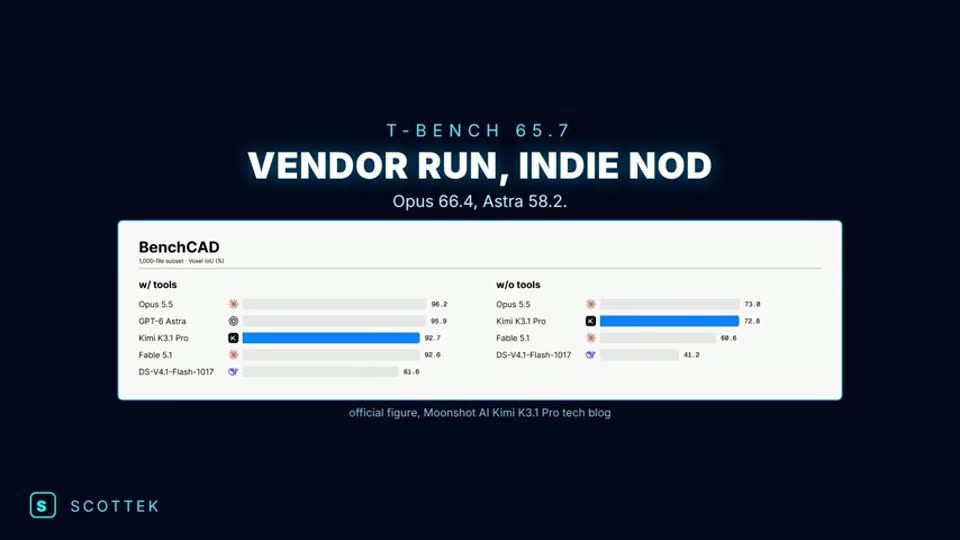
- In the video: on Terminal-Bench 4.0, Moonshot's own run scores 65.7 percent, just under Opus at 66.4 and well ahead of Astra at 58.2, and this one stays labeled vendor-run, though the independent index points the same direction.
- In the video: BenchCAD lands at 92.7 percent with tools against 96.2 for Opus and 95.9 for Astra, and 72.8 without tools, basically tied with Opus at 73, while finance benchmarks show state of the art on OfficeQA Pro v2 at 64.4 with an internal hallucination rate falling from 23.4 to 8.3 percent, all vendor-reported.
- In the video: the honest weak spot is Terminal-Bench Science at 38.1 against 68.1 for Astra and 63.3 for Opus, so the read is coding monster, science meh, meaning you buy this for agents and code, not the lab.
Try it today, and what it costs
- In the video: the API costs 2 dollars per million input tokens and 10 dollars per million output, a third cheaper than K3, with cache hits at 20 cents, and Artificial Analysis measured 77 tokens per second output with about 150 million output tokens per index run, landing each index task near 2 dollars against nearly 6 for Opus and over 7 for Fable.
- Added from the sources: the HandyAI breakdown carries the measured speed and per-task cost figures, and the platform docs confirm the 2-in-10-out pricing with cache pricing, checked October 2026.
- In the video: you can try it free right now on the Kimi website and apps with limited usage, or through the API after a 1-dollar top-up, while Highspeed costs double for two to three times the pace, and until November 4 every run goes through Moonshot's servers.
- Added from the sources: Notebookcheck confirms the model is live on kimi.com, the iOS and Android apps, the Kimi Work desktop app, Kimi Code, and the API including a limited free plan, and notes zero data retention is mentioned for API customers only, which is why the video points privacy-minded readers at the channel's Qwen lockdown guide, checked October 2026.
The safety strip and the license fine print
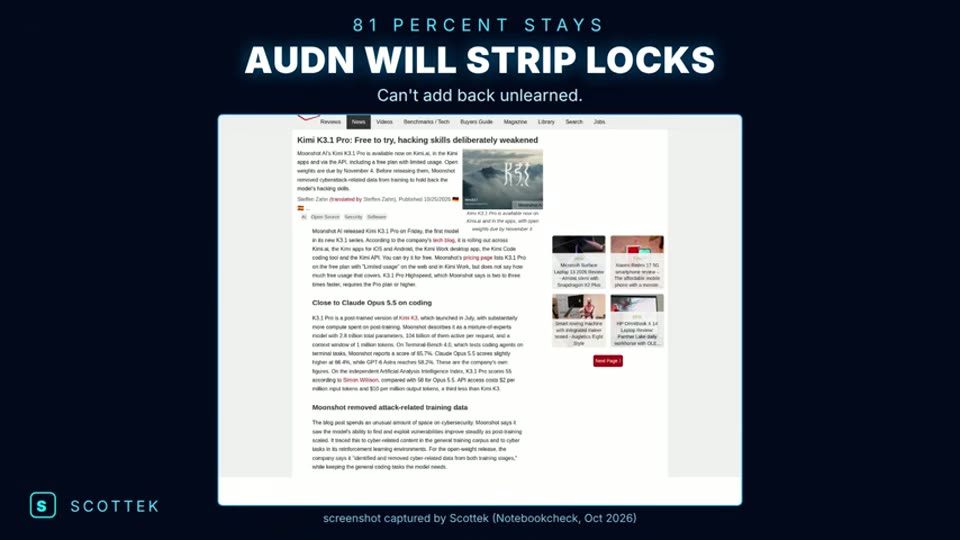
- In the video: Moonshot says exploit-finding ability climbed as post-training scaled, so for the open release it stripped cyber-related data out of both training stages, with the uncleaned checkpoint solving 90.5 percent of an internal exploit test against 81 for the shipped model, where the original K3 scored 33.3.
- Added from the sources: the Moonshot tech blog carries the cybersecurity section, and Notebookcheck reports the removal plan plus the fact that one company already announced plans to strip safeguards post-release, which cannot add back capability the model never learned, and none of these safety numbers are independently verified, checked October 2026.
- In the video: Moonshot calls K3.1 Pro open-weight, never open-source, and the announcement names no license at all, so the precedent matters, since Kimi K3 shipped under a bespoke Kimi K3 License rather than the modified MIT of the K2 line, with a separate agreement required for large model-as-a-service businesses over 20 million dollars in twelve months.
- Added from the sources: the K3 license history is documented in Simon Willison's K3 notes, and the direction stands as check the model card on day one, especially before serving the model to others, since open weights means downloadable and does not mean open-source, checked October 2026.
Can your homelab run it
- In the video: the K3 generation on the same 2.8T base needed about 1.4 terabytes for weights alone at four bits per parameter with a 1.56-terabyte full-precision repo, and Unsloth's dynamic quants shrink that to 594 gigabytes on disk needing 610 gigabytes combined RAM plus VRAM for the smallest 1-bit build, 861 gigabytes needing 880 for the 2-bit build, and back up near 1.56 terabytes for near-lossless 8-bit.
- Added from the sources: the K3 self-host measurements come from ComputingForGeeks, Tokios, and SSDNodes, which describe a measured 4x A100 plus 2TB RAM class box, 128GB unified RAM minimums for small quants, about 5-plus tokens per second with a 16GB GPU backing 256GB RAM, an 8x 288GB multi-user serving recipe, and Moonshot's own 64-plus accelerator supernode recommendation, checked October 2026.
- In the video: K3.1 quant sizes are still unknown, so expect the same class and confirm on day one, because no single gaming GPU on earth loads this model.
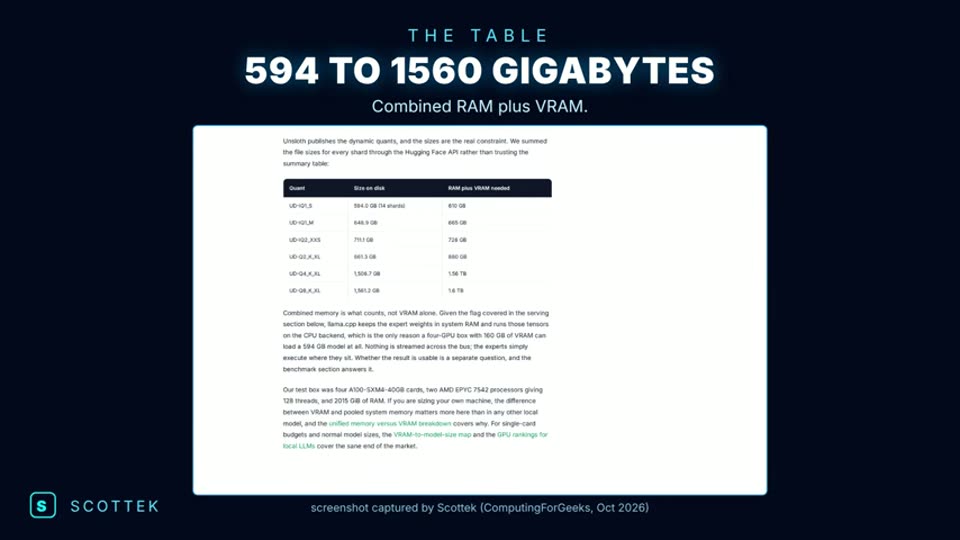
- In the video: the prep checklist runs in order, starting with freeing disk at 650 gigabytes minimum for the smallest quant, 900 for the sensible one, and 1.6 terabytes for full quality, then counting combined RAM plus VRAM rather than GPU alone, picking an engine now from
vLLM,SGLang,KTransformers,TensorRT-LLM, orllama.cpp, watching Unsloth's GGUF releases on day one, and reading the license file before serving it to anyone. - In the video: engine setup steps are prep guidance only and untested against K3.1 weights that do not exist yet, so treat any install commands as untested until the weights land and confirm quant names and flags against the day-one model card.
- In the video: the verdict is simple, since K3.1 Pro is the first soon-to-be-open model that genuinely trades punches with the closed frontier on agentic coding at roughly a third of the API cost, but science scores lag, the safety-stripped 81 percent is still potent, the license is unwritten, and most homelabs will meet this model through the API or a multi-node cluster rather than a single GPU.