Install Gately 0.5.8 on Ubuntu 24.04: Your Own Homelab Gateway

Starting point
This guide is a companion to the video Install Gately 0.5.8 on Ubuntu 24.04: Your Own Homelab Gateway. The install path below follows what the transcript describes, and anything checked against the project docs is labeled as added research. This install was not re-run for this guide, so anything beyond the documented commands is marked untested.
What the video claims
The transcript describes Gately as an open-source homelab gateway shipping as one binary with reverse proxy, tunnels, and certificates. For version 0.5.8 it highlights app login and file sharing. The install path it outlines is 64-bit Ubuntu 24.04 plus curl and tar, no root or container needed, with a binary folder, a data folder, archive download plus checksum check, extraction, install to a local bin folder, version check reporting v0.5.8, first run with a home-directory data folder and localhost-only admin bind, sign-in on port 16680 with a documented default login, then change the password, enable two-factor, and confirm unauthenticated API access is rejected. It closes by calling the project about 10 days old, advising LAN-only use, and suggesting reverse proxy, then TLS, as next steps.
What the docs confirm
Added research confirms the core identity and several video claims against the official sources linked below.
- Project home - the real repo is Gately on GitHub, described as an open-source network gateway for homelabs and servers covering DDNS, STUN traversal, port forwarding, reverse proxy, ACME certificates, WAF, Tailscale, frp, and Cloudflare Tunnel in one binary.
- Version 0.5.8 timing - the v0.5.8 GitHub release is dated October 24, 2026, matching the transcript, and the v0.5.8 release notes list OIDC single sign-on and SMB file sharing as the headline features.
- App login claim checks out in substance - the release notes describe a built-in OpenID Connect identity provider for apps such as Gitea, OpenList, and Grafana, with shared users, TOTP reuse, and group claims, documented further in the install and module docs.
- File sharing claim checks out in substance - the release notes add an SMB Service for sharing local directories, with per-user shares and read-only options, on Linux and macOS only.
- Single binary size - the project site describes a single embedded-UI binary around 32 MB, consistent with the one-binary claim.
- Default port - the quick-start guide and install docs put the admin UI on port
16680, matching the transcript. - Default login - the install docs give the default account as
adminwith default passwordgately.cnand warn that it is public and must be changed, matching the transcript's change-it-immediately advice. - Two-factor - the quick-start hardening section tells new installs to change the password and enable TOTP two-factor, and documents password and TOTP reset commands for lockouts.
- Project age caution is reasonable - a third-party repo mirror dates creation to mid-October 2026, consistent with the about-10-days-old warning, and a newer v0.5.9 was already published after the video date, so treat this 0.5.8 guide as pinned to the video version.
- Download source - official archives and checksums live on the GitHub releases page, mirrored by the download page.
Install outline on Ubuntu 24.04
This section stays close to the video path and stays generic wherever the transcript gives specifics that could not be verified in the docs.
- The video asks for 64-bit Ubuntu 24.04 with
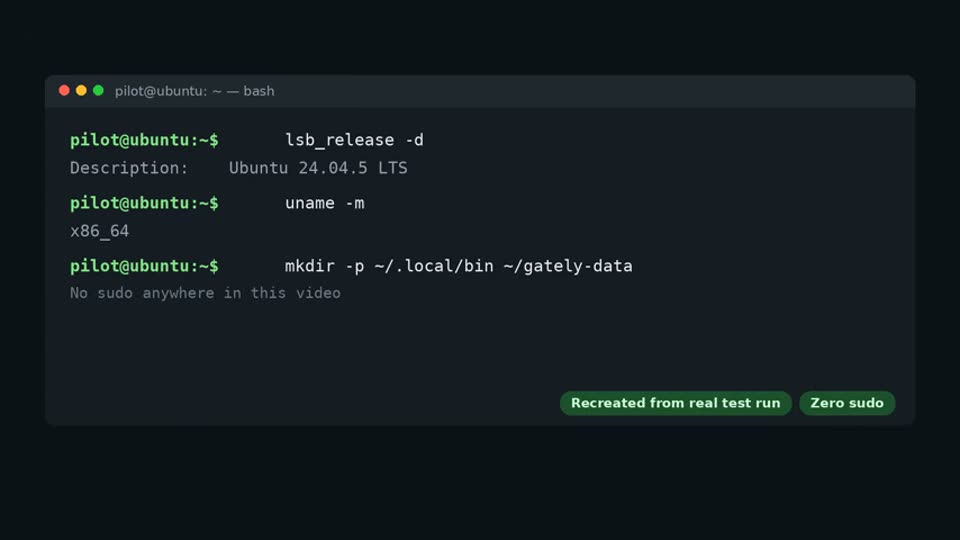
curlandtaravailable, with no root login, container, or account needed, and the on-screen pre-check showslsb_release -dreporting Ubuntu 24.04.5 LTS withuname -mreportingx86_64. - It describes making a folder for the binary and a separate folder for Gately data, shown on screen as
mkdir -p ~/.local/bin ~/gately-data, with no sudo anywhere. - Added research confirms the 0.5.8 Linux x86-64 asset is named
gately_v0.5.8_linux_amd64.tar.gzwith a release-levelchecksums.txt, so prefer those exact names from the v0.5.8 GitHub release rather than guessing similar names, then download the Linux archive and the checksums file. - The video then extracts the archive, copies the binary to a local bin folder, marks it executable, and asks it for its version, shown on screen as
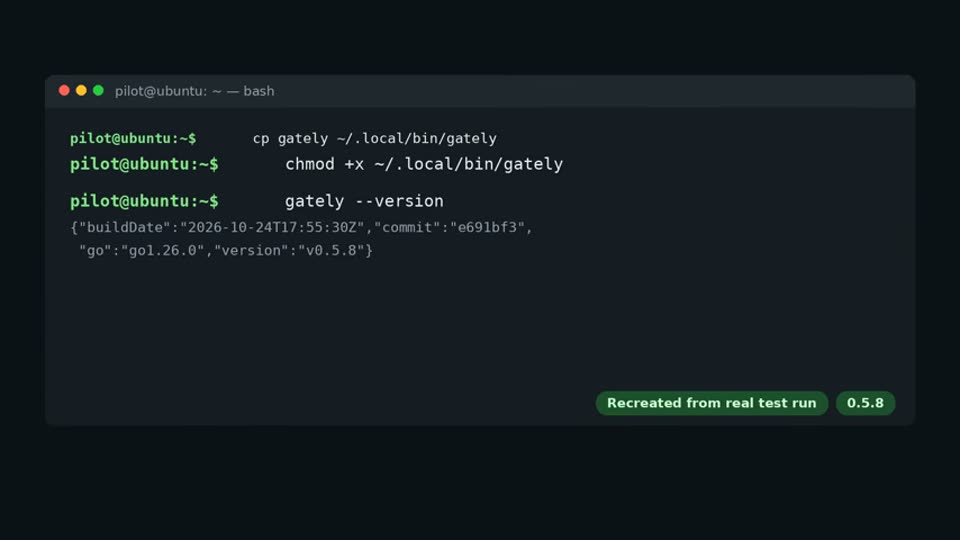
cp gately ~/.local/bin/gatelypluschmod +x ~/.local/bin/gately. - The on-screen version output is JSON reporting
versionv0.5.8 withbuildDate2026-10-24T17:55:30Z,commite691bf3, andgogo1.26.0, which matches the transcript's October 24th build claim. - The video describes pointing Gately at a data folder inside the home directory and binding the admin page to localhost only, then letting it write config and print first-run login details.
- Those data-folder and bind-address flags are also untested and unverified here, so consult the command's built-in help for exact option names before running it outside a lab.
Verify the download and confirm the version
Both the video and the docs agree on this habit, and this is the one step with a fully documented command.
- Added research confirms every release ships
checksums.txtwith SHA-256 hashes plus Sigstore signatures and provenance, described in verifying release artifacts. - The documented archive check is
sha256sum -c checksums.txt --ignore-missing, run in the folder holding the downloaded archive and checksum file. - The video's hash-matches claim is plausible but unverified as a test result here, since the files were not downloaded or hashed for this guide.
- If the hash fails, stop, re-download from the official release page, and do not copy the binary anywhere.
- After installing, confirm the binary the same way the video does, by running the version command and expecting the JSON shown on screen with
versionv0.5.8 andbuildDate2026-10-24T17:55:30Z.
First run and admin sign-in
This is where the video and the docs line up best, with one flag-level exception.
- Added research confirms the admin UI listens on port
16680by default, so a LAN check from the video such as opening the admin page in a browser matches the quick-start guide. - Added research confirms the default sign-in is user
adminwith passwordgately.cn, with a persistent warning until it is changed and an onboarding flow covering password, two-factor or passkey, self-check, import, and notifications. - The transcript's localhost-only bind detail is untested and unverified here, so if you follow the video's localhost approach, confirm the actual listening address in the terminal output before assuming it is loopback-only.
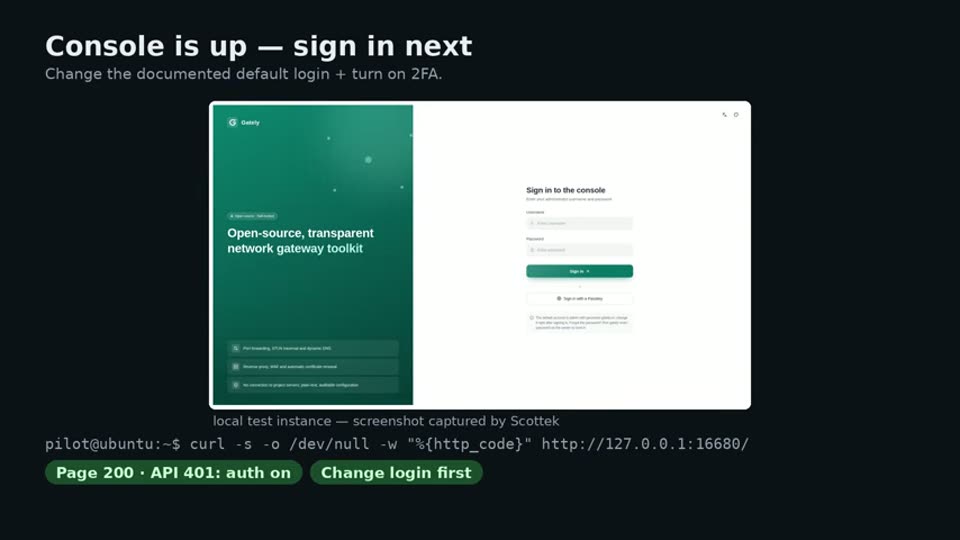
- The transcript's claim that an unauthenticated API call returns unauthorized is confirmed on screen in substance, the video's health check shows the console page serving with HTTP 200 while the API enforces auth with 401, though this was not independently probed for this guide.
- The on-screen health check is
curl -s -o /dev/null -w "%{http_code}"against the local port16680, so expect the page to answer while the API refuses anonymous calls. - On a new project this age, keep the listener on loopback or LAN only until hardening below is done.
Harden before exposing anything
Both the video and the docs treat the default credential as public, so treat this as mandatory rather than optional.
- Change the
adminpassword immediately and enable TOTP two-factor or a passkey, per the quick-start guide. - If you lose access later, added research documents
gately reset-passwordfor restoring the default andgately reset-totpfor clearing two-factor, run with access to the config directory. - Consider the documented extras the video skips over, such as a secure entrance path, LAN-only access, and admin UI HTTPS, before any reverse proxy or TLS work.
- Added research found online upgrades for Linux binaries run only from the About page when an admin clicks, with SHA-256 verification and a kept prior binary, so do not expect silent background updates.
- This article contains no affiliate links, and the voiceover-tool plug from the video description is not reproduced here.