This guide is the companion to Linux 7.3 Is Stable: Should You Upgrade? — start there for the full walkthrough, then use this page as the reference you can check at your own pace.
In the video: the presenter gives an up-front verdict, walks through what shipped in 7.3, runs a read-only kernel check on the bench machine, and lays out per-distro upgrade paths.
Added from the sources: this article adds the primary-source receipts behind those claims, the exact deprecation wording, and the dated distro snapshot — kept visibly separate from what the video covers.
The short answer: upgrade now, wait, or skip
In the video: the verdict is simple — if your distro hands you 7.3 through its normal update path, take it, and if you are on Ubuntu 26.10 you already have it, but nobody else should go hunting for it.
Added from the sources: 7.3 went stable on Sunday, October 18 2026, on schedule after 7 release candidates, with 15,267 commits making it the second-busiest merge window ever behind 6.7 and the tree at roughly 41 million lines — reported by Phoronix and LinuxCompatible.
Upgrade with intent if you are in one of these groups:
Desktop and gaming users on ~8GB VRAM cards or older AMD hardware — the Valve-led video-memory rework and reset-recovery fixes target exactly you.
Homelab server owners on Gen 5 NVMe drives, Btrfs users running databases or VMs, or anyone whose new gadget only exists in 7.3, like the 2026 Steam Controller.
Laptop users on recent hybrid Intel/AMD mobile chips — the scheduler and enablement fixes help, but only via your distro package, never a hand-installed build.
Wait if you are on an LTS or stable distro that has not packaged 7.3 yet — a week-old kernel still has first-week risk that distro packaging shakes out, and the gains are incremental for web-and-terminal life.
Skip entirely if you choose kernels to live on for a year — 7.3 is not long-term support and gets only the standard window of roughly two to three point releases.
Verdict matrix from the video: three groups say yes and everyone else waits, with gamers and Gen5 database users in and LTS, Proxmox, NVIDIA, and ZFS riders waiting (Still from the walkthrough video.)
What is new in 7.3
In the video: gaming first, storage second, silicon enablement third, plus a mount-namespace hardening change that touches homelab container hosts directly.
Added from the sources: the details below come from the Phoronix release coverage, the UbuntuHandbook roundup, and the kernel documentation — not from presenter testing.
Gaming — reworked vRAM handling for cards with limited VRAM (especially ~8GB cards), a kernel driver for the 2026 Steam Controller, an MSI Claw gamepad driver Valve contributed to, AMD GFX6 format modifiers for Wayland compositors, GFX7 GPU reset recovery, and scheduler work that helps older hardware.
Budget-GPU card from the video: pages smarter with resets cleaner, around 8GB VRAM paging, GFX6 modifiers and GFX7 reset recovery, 2026 Steam Controller and MSI Claw drivers, and a right-sized hybrid scheduler (Still from the walkthrough video.)
Storage and filesystems — Btrfs direct I/O via iomap climbs from about half of theoretical max to around 95% on some direct-I/O workloads (that qualifier matters — it is not every workload), free-space cache v2 becomes the default, a small-I/O bottleneck fix lands for Gen 5 drives, NTFS gains Windows System Compression read support, FUSE gets io_uring pools, and the in-kernel SMB server gains opt-in Apple Time Machine support via reverse-engineered negotiation — which some admins debate on attack-surface grounds.
Silicon — AMD Zen 6 prep, Intel Xe3P Nova Lake iGPU now stable and enabled by default, an SMP latency rework cutting worst-case stalls from ~17ms to ~1.5ms in the reported DPDK case, per-CCD temperature readings on EPYC Zen 5, and initial Apple M3 Pro/Max/Ultra CPU-only bring-up with no GPU support — not day-to-day usable, stated plainly.
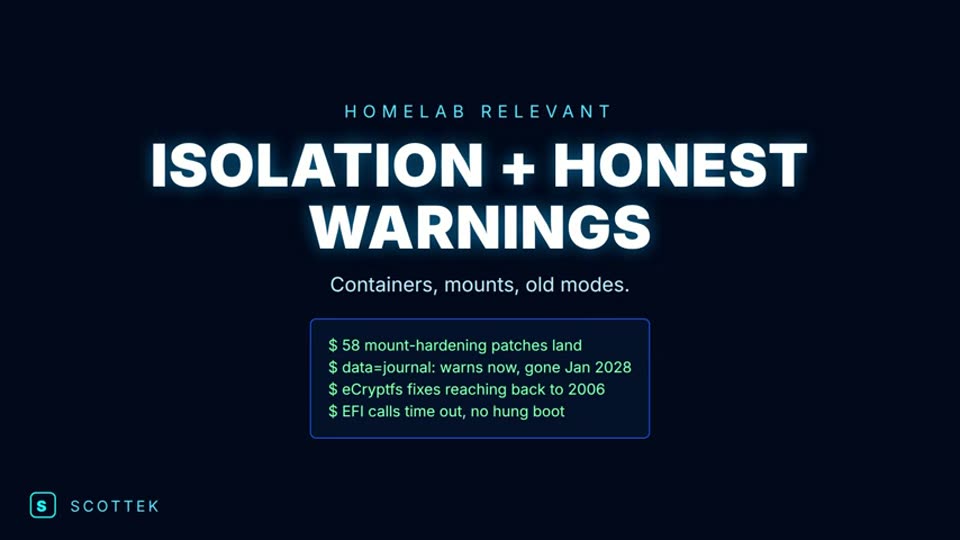
Containers and hardening — 58 patches of mount-namespace hardening strengthen bind-mount isolation for LXC, Docker, and Proxmox-style setups, EFI runtime calls now time out instead of hanging boot, and the FailFS testing filesystem was merged for fault-injection work only.
Warnings before you touch anything
In the video: NVIDIA and ZFS riders are told to check one thing before rebooting, Proxmox users are told to wait for the PVE kernel, and everyone is told to keep the old kernel in the boot menu.
Added from the sources: no 7.3-specific NVIDIA or ZFS breakage was found in research as of October 21 — the caution is generic DKMS timing, since third-party modules trail mainline and no vendor owes day-one support.
ext4 data=journal is deprecated as of 7.3 with removal in January 2028 — the kernel docs say verbatim that the feature is deprecated and support will be removed in January 2028, the kernel prints a boot warning on every such mount, and Phoronix plus a practical detection guide cover the details — if you set that mode years ago for something safety-critical, start planning the move now while it is a warning and not a boot failure.
Proxmox VE tracks its own kernels — PVE users wait for the PVE kernel and never mainline a homelab hypervisor.
The Ubuntu mainline kernel PPA is broken again — do not fetch an unsigned build from the internet and enroll security keys over it, per the video and the UbuntuHandbook report.
7.3 may or may not become this year's LTS — Greg Kroah-Hartman is undecided, with 7.4 (merge window ~November 1, final ~late December) the other candidate, so anyone wanting longevity should pick from the current longterm list of 6.18, 6.12, 6.6, 6.1, 5.15, and 5.10.
Homelab-relevant card from the video: 58 mount-hardening patches, data=journal warning now with removal in January 2028, eCryptfs fixes back to 2006, and EFI calls that time out instead of hanging boot (Still from the walkthrough video.)
Check your kernel, then upgrade by the book
In the video: the presenter runs a 30-second read-only kernel check on the bench box — which is still on 7.0, stated honestly on camera — covering the running kernel, a data=journal grep, and the installed-kernel fallback list, with nothing installed and nothing rebooted.
Added from the sources: the commands below are reproduced from the video narration and were not independently tested for this article — they are read-only, but run them at your own discretion.
Run the check first:
uname -r — shows the running kernel so you stop guessing.
grep data=journal /etc/fstab — surfaces the deprecated ext4 mode if it is hiding in your mounts.
ls /boot — lists installed kernels so you know your fallback.
dpkg -l linux-image* — on Debian-family systems, shows which kernel packages are installed.
Distro snapshot, captured October 19 2026 — this will have drifted by the time you read this, so treat it as a starting point and check your own repos:
Ubuntu 26.10 ships the 7.3 series (7.3.0-9) in the box, and 26.04 LTS users on the HWE track pull the 7.3 series through normal updates.
Fedora 44 was on 7.2.6 with 7.2.11 queued and 7.3 days away via the routine update path.
Arch was on 7.2.7 and CachyOS on 7.2.8, with 7.3 landing on each rolling schedule.
When your repo has it, upgrade like a grown-up — back up data and configs first, snapshot hypervisors with a restore you have actually tested, update only through your distro's own path, confirm the old kernel is still in the boot menu before rebooting, reboot when you can afford ten minutes of surprise, check dmesg for anything red, and test on a spare node or VM first if you have one.
Bottom line
In the video: 7.3 is a healthy performance and enablement release — take it when your distro offers it, otherwise change nothing.
Added from the sources: nothing in the primary sources contradicts that verdict — the commit scale, the targeted gaming and I/O gains, and the standard (non-LTS) support window all point the same way.
Now your turn — what kernel is uname -r showing you right now, and is your distro offering 7.3 yet? Drop it in the video comments.