OctoPrint 2.0.0 Ubuntu Install: Your Own Print Server

This guide is the written companion to OctoPrint 2.0.0 Ubuntu Install: Your Own Print Server, a video published 2026-11-17. Start with the video for the visual walkthrough and use this page for the commands and background reading. Anything beyond what the video shows is added research and is labeled as such.
Transcript note: auto-generated subtitles could not be fetched for this video, so the video-side claims below are grounded in the video description plus the Prag research folder dated 2026-11-16, which serves as the transcript-equivalent.
What is new in OctoPrint 2.0.0
The following context comes from the official release announcement, not from the video itself.
- OctoPrint is the free self-hosted web interface for controlling consumer 3D printers, released under the GNU Affero General Public License v3. See the OctoPrint GitHub repository and the official site at octoprint.org.
- Version 2.0.0 was published 2026-11-16 after a 7-month release-candidate phase, and it rebuilds printer communication around connector plugins. The old serial layer is now a bundled Serial Connector, with Moonraker/Klipper and local Bambu connector plugins arriving alongside it. Details are in the official OctoPrint 2.0.0 release announcement and the 2.0.0 changelog.
- This release requires Python 3.9 or newer. Python 3.7 and 3.8, still allowed by 1.11.x, are dropped. Ubuntu 24.04 ships Python 3.12.3, which satisfies that floor.
- The one official install path taught here follows the OctoPrint setup documentation: a user-owned virtual environment, OctoPrint installed into it with pip, then
octoprint serve, which binds port 5000 by default.
What you need
- In the video: 64-bit Ubuntu 24.04 with internet access.
- In the video: a sudo account, since the
aptstep and the optional boot service need root. - In the video: about 1 GB free for the venv and dependencies, with port 5000 free for the viewer install.

Isolate it in a venv
The video creates an isolated environment in the home directory so OctoPrint's roughly 80 dependencies never touch system Python. This matches the official guidance to use venv for isolated installs. See venv creation of virtual environments and installing packages with pip and venv.
sudo apt update— refresh package lists (needs a sudo account).sudo apt install -y python3-venv— venv tooling (needs a sudo account, untested here).python3 -m venv ~/OctoPrint— create the isolated environment.source ~/OctoPrint/bin/activate— activate it. (The venv creation itself is a viewer step; the video's install frame below shows the pinned pip install that follows.)
Pin the release and prove the binary
pip install OctoPrint==2.0.0— install the exact pinned release (takes a few minutes).octoprint --version— expected output isoctoprint, version 2.0.0.
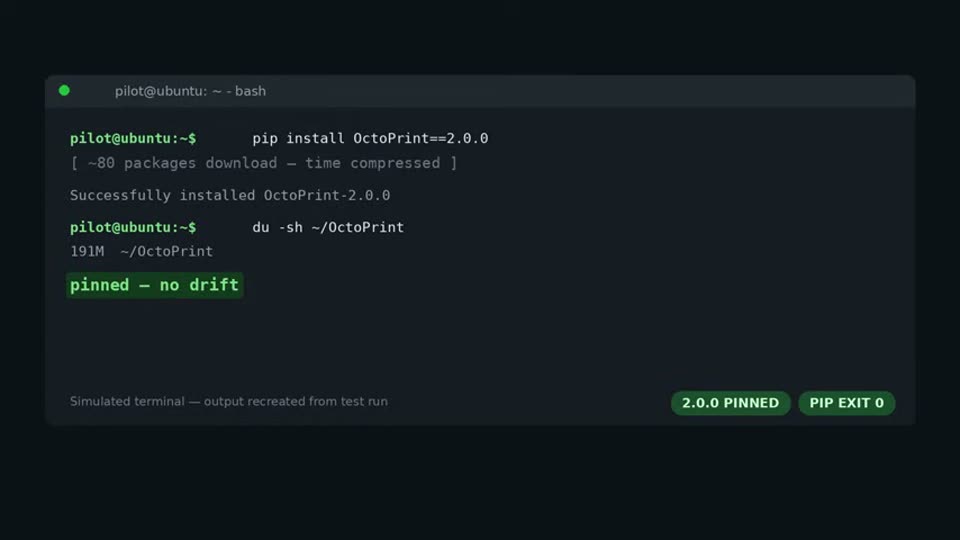
Why the exact pin matters: it guarantees you get the tested 2.0.0 release rather than whatever PyPI resolves to later. The sandbox run recorded in the research folder installed 79 wheels into a 191 MB venv and printed octoprint, version 2.0.0 verbatim.
Start the server and finish the wizard
~/OctoPrint/bin/octoprint serve— start the server. The expected log line mentions listening on port 5000.- Open
http://YOUR_MACHINE:5000/in a browser and complete the Setup Wizard (Access Control plus a printer profile). - Connector plugins for Klipper/Moonraker or local Bambu install later from the built-in Plugin Manager. (The browser wizard screens are viewer steps; the video's third frame below covers the optional boot service instead.)
Optional boot service (viewer step, untested — needs root): install a systemd unit at /etc/systemd/system/octoprint.service running /home/YOUR_USER/OctoPrint/bin/octoprint serve as your user, then sudo systemctl daemon-reload, sudo systemctl enable --now octoprint, and confirm with systemctl is-active octoprint (expected: active).
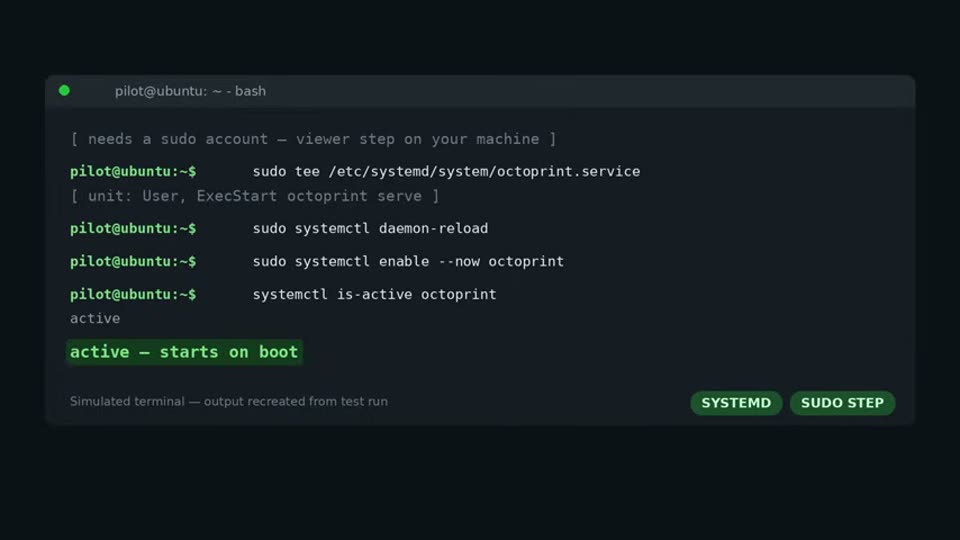
Verify through HTTP in a second terminal while the server runs:
curlthe index page and expect HTTP 200.- Expect the page to carry the version marker and the Setup Wizard text.
Note: the /api/version endpoint is auth-gated before the wizard and returns an auth error without a key. That is expected behavior, not a failure. The install check is the public index page, not the API.
Paths the video does not take
- OctoPi Raspberry Pi image — the Pi path, wrong platform for an Ubuntu x86 guide.
- Snap or distro deb — no official snap or Ubuntu package tracks 2.0.0.
- Source checkout (
pip install .from git) — unnecessary when the pinned PyPI wheel installs the identical release. - Docker image — an official image exists but adds a daemon prerequisite and was not tested the same way, so the single pip path stays reproducible.
Sources
- OctoPrint 2.0.0 release announcement — https://octoprint.org/blog/2026/11/16/new-release-2.0.0/ — published 2026-11-16 — accessed 2026-11-19 — supports the 2.0.0 date, the connector-plugin architecture, and the Python 3.9 floor.
- OctoPrint releases on GitHub — https://github.com/OctoPrint/OctoPrint/releases — tag 2.0.0 published 2026-11-16 — accessed 2026-11-19 — supports the release date and changelog contents.
- OctoPrint setup and usage docs — https://docs.octoprint.org/en/dev/gettingstarted.html — living doc — accessed 2026-11-19 — supports the user venv method,
octoprint serve, the default port 5000, and the first-run wizard. - OctoPrint on PyPI — https://pypi.org/project/OctoPrint — living doc — accessed 2026-11-19 — supports the pip-installable release.
- Python venv documentation — https://docs.python.org/3/library/venv.html — living doc — accessed 2026-11-19 — supports venv isolation behavior and
python -m venvusage.