Install Hob on Ubuntu: Free Offline AI in Minutes

Companion guide and video starting point
This article is a companion to the video, not a replacement for it, and the video is the starting point for everything below.
In the video: a short walkthrough installs Hob 0.2.4 on Ubuntu 24.04 from the official GitHub release, verifies the download, fixes the missing libfuse2 launch error with libfuse2t64, and reaches first launch, where Hob downloads the model that fits the PC. The video lists what you need as 64-bit Ubuntu 24.04, curl, about 1 GB free for the app plus several GB spare for the model, and sudo for one package.
Added from the sources: every version number, link, and product claim below was checked against the Hob repo, the releases page, the v0.2.4 release, the docs, and the Hacker News thread on 2026-10-29. No live install was run for this companion, so hands-on steps are marked untested here.
What Hob is and what you need
In the video: Hob is a free open-source app that runs AI on your own computer with no cloud, no subscription, and offline use after setup. You need 64-bit Ubuntu 24.04 with curl and sudo access, about 1 GB free for the app plus several GB spare for the AI model Hob downloads on first launch.
Added from the sources: the Hob repo describes Hob as an easier way to use AI on your own computer, a free open-source alternative to Claude and ChatGPT that runs open-weight models like Gemma and gpt-oss locally, with MIT-licensed app code. Model weights carry their own vendor terms for Gemma and gpt-oss, so the app is free while the weights follow their own licenses. There are no independent benchmarks cited here, and the author's picker target of roughly 15 tokens per second is the author's own figure. The Hacker News thread records strong early interest with a score of 172 and 42 comments. One version note matters before you download, because the video pins 0.2.4 while the releases page now lists 0.2.5 from later the same day, and the install flow below is the same for either, so pick the version you want on the releases page.
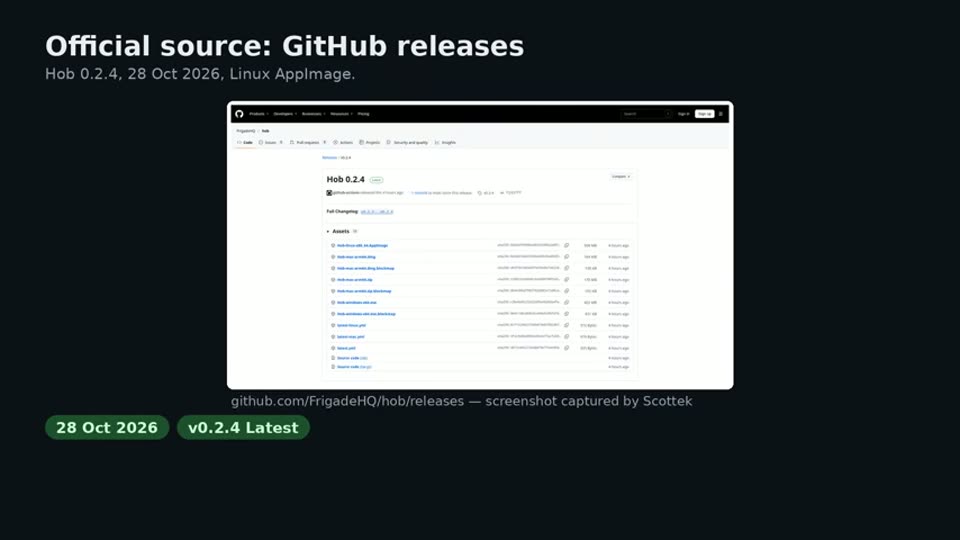
Download, verify, and fix the FUSE launch error
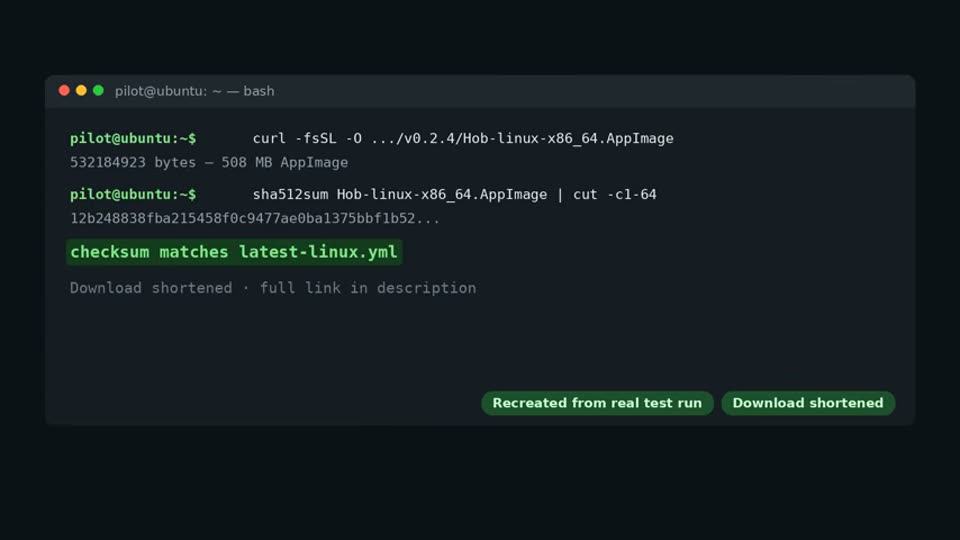
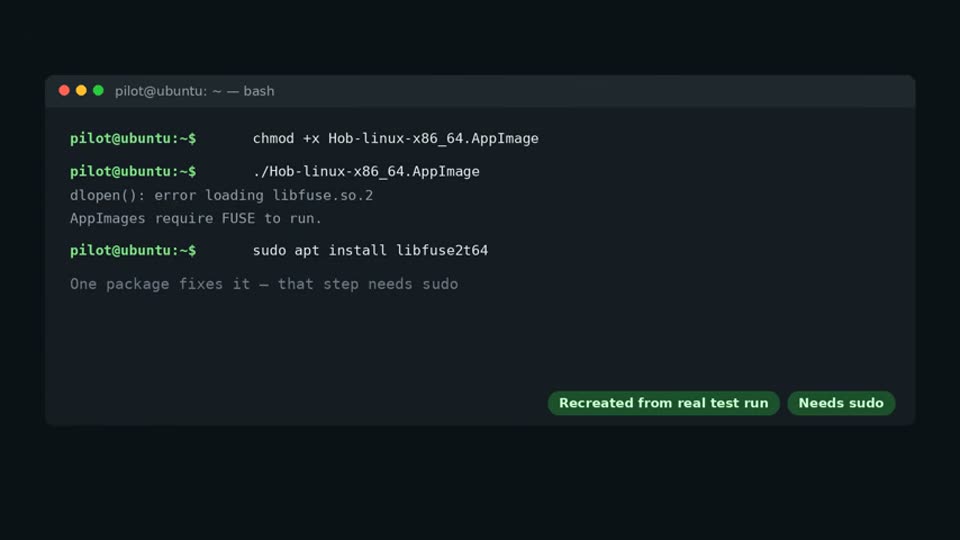
In the video: download the official v0.2.4 Linux Hob-linux-x86_64.AppImage file of about 532 MB, verify the size and checksum against the published release metadata, then fix the one error every Ubuntu user hits, the missing libfuse2 error, with libfuse2t64.
Added from the sources: the v0.2.4 release lists Hob-linux-x86_64.AppImage at 532184923 bytes, which matches the video's 532 MB figure, and the direct release download was verified live. Concretely, that is fetch the AppImage from the release, compare its size against the release metadata, make it executable, install the fix with sudo apt install libfuse2t64, then launch the AppImage. The releases page is the source to trust if a newer release such as 0.2.5 has replaced the pinned file names, and the docs confirm Windows and Linux users pick the install drive. The full hands-on flow is untested here beyond the video's account and the live link checks.
First launch and what stays offline
In the video: launch Hob and let it download the model that fits your PC, then find your chats and models under ~/.config/Hob.
Added from the sources: the docs state that Hob checks your hardware on first launch and downloads the best model it can run well, with Gemma 4 tiers by memory and gpt-oss for workstations, switchable at any time, and the Hacker News thread attributes the same auto-pick framing to the author. The project states there is no telemetry, and the docs frame Hob as online only for model downloads and checks, web search while left on, user-added connectors, and explicit code fetches such as Python packages from PyPI, with a Web-access toggle for fully offline use. The docs also document Linux storage under ~/.config/Hob, sandboxed Python tools, approvals before folder changes, Undo for every task, and 32 languages. First launch and the model download are untested here.