Claude Code Backdoor: Check Your SSH Keys Now (2026)

Companion guide and video starting point
This article is a companion to the video, not a replacement for it, and the video is the starting point for everything below.
In the video: the presenter responds to a trojanized Claude Code extension that shipped from Cursor's own marketplace on October 29, walks a live check for the planted SSH key on his own bench, and gives the cleanup order for anyone who finds it, closing with three habits for keeping a dev machine from becoming a path into a self-hosted lab.
Added from the sources: every consequential claim below is checked against Cursor's security notice, the independent Phorion advisory, the Microsoft Threat Intelligence analysis, and BleepingComputer's reporting, all checked November 2026. Anything not independently verified is marked untested rather than stated as fact.
What happened and who was in the window
In the video: between 27 minutes past 2 in the morning and 35 minutes past 1 in the afternoon Pacific time on October 29, Cursor's extension marketplace served modified builds of Anthropic's Claude Code extension, versions 2.1.312 and 2.1.313, for Mac and Windows. The extension ID and publisher name matched the real thing, so automatic updates pulled it in silently, and Cursor puts the exposure at up to 5,000 users.
Added from the sources: Cursor's security notice confirms the window, the two versions, and the Mac plus Windows scope, and states the code was not written by Anthropic. Microsoft Threat Intelligence confirms the incident is limited to the Cursor marketplace, that the Visual Studio Marketplace and the npm package were never affected, and that Anthropic confirmed its own systems were not compromised. BleepingComputer confirms the roughly 11-hour window, the up-to-5,000-developer exposure, and the silent auto-update pull, and notes that early reports of spread to npm, OpenVSX, or the Visual Studio Marketplace were wrong.
- If you installed or updated the Claude Code extension from inside Cursor, on Mac or Windows, between those hours on October 29, assume exposure until the check below says otherwise.
- Linux installs from that marketplace were never shipped the bad build, and anything outside the 11-hour window is clean.
- The official Visual Studio Marketplace, OpenVSX, and npm were never affected.
What the trojanized build does once it loads
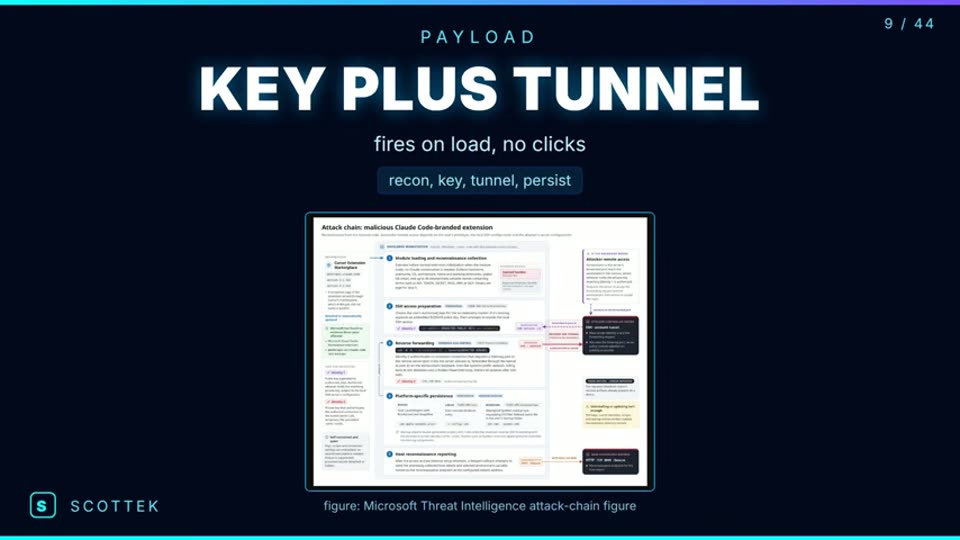
In the video: the injected code runs the instant the extension module loads with no clicking required. It first collects reconnaissance, meaning hostname, username, operating system, home folder, git email, public IP address, and the names, not the values, of up to 40 environment variables that look like keys, tokens, or cloud credentials. It then appends an attacker-controlled key labeled svc-telemetry to the SSH authorized keys file, tries to switch on the SSH service, opens a reverse SSH tunnel to an attacker server, and installs persistence that retries the tunnel about every 60 seconds. The video also passes on independent analysis: on the Mac the implant checks remote-login status with a command that needs administrator rights without having them, gets an error instead of an answer, and skips the enable step, while on Windows it routes SSH setup through a Unix shell path that does not exist there, so on most machines the tunnel could never log in, but the keys, the persistence, and the reconnaissance still landed.
Added from the sources: Microsoft Threat Intelligence confirms the loader runs at module load and attempts to add the attacker SSH key, enable the local SSH service, establish reverse SSH forwarding, configure persistence, and report host details, and confirms the reconnaissance sends environment variable names rather than values. The Phorion advisory confirms both setup bugs described in the video, notes the shipped builds covered darwin-arm64 and win32-x64, warns that the implant's crontab handling can wipe existing user cron jobs on repeat runs, and cautions that the key-collision check matches on the comment string, so hunting by fingerprint is more reliable. BleepingComputer confirms the same bug analysis and the same bottom line that keys, persistence, and reconnaissance land even where remote access fails.
- The reconnaissance inventories credential-adjacent environment variable names, which tells an attacker exactly what to go after if access follows.
- Uninstalling the extension is not sufficient, because the persistence artifacts keep running on their own.
- Full indicator strings, including key fingerprints and file hashes, live on Cursor's security notice and are not reprinted here, so treat that page as the canonical indicator list.
Run the check on your machine
In the video: the presenter runs the check live on his own bench with no screenshots. First he searches the authorized keys file for the planted label, which on Mac or Linux is one grep for svc-telemetry. Second he looks at which Claude Code builds are actually installed in his editors. Third he fetches the advisory itself live from Cursor to confirm it. The bench has no Cursor install and no planted key, which is exactly what clean looks like, and the video also shows the attacker's key fingerprint so viewers know what dirty looks like too.
Added from the sources: Cursor's security notice is the document to check against, and it carries the full indicator list including the planted-key fingerprints. The demo bench in the video is a Linux machine with no Cursor editor install, so the Mac grep and the Windows-side checks are carried through as documented vendor steps rather than executed runs, and the platform remediation commands in the next section are likewise documented steps, untested here.
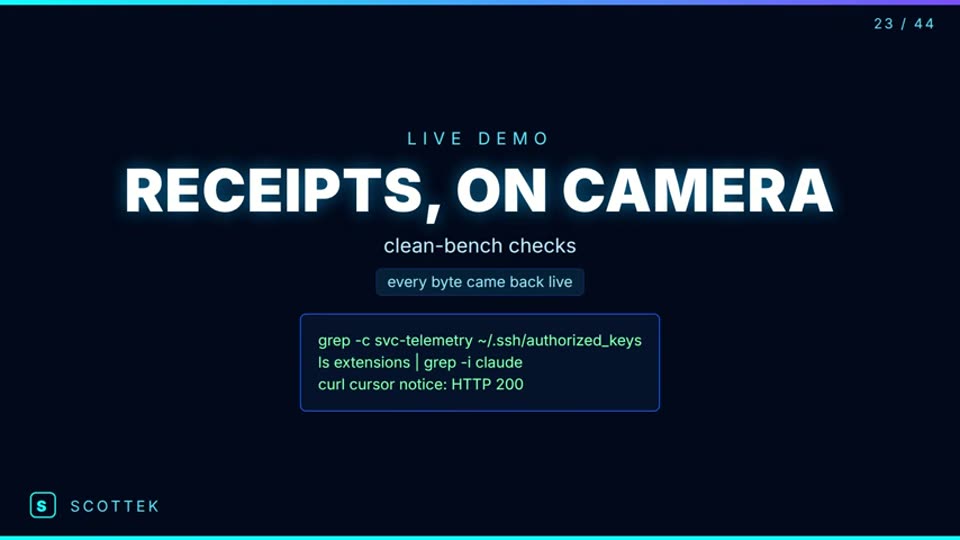
- On Mac or Linux, search with
grep svc-telemetry ~/.ssh/authorized_keysand treat any match as exposure. - Check which Claude Code builds sit in each editor you use, and compare against the 2.1.312 and 2.1.313 bad builds and the clean 2.1.314 replacement.
- On Windows, follow the check path in Cursor's security notice, since the exact Windows-side commands are untested here.
- A key-collision check that matches on the comment string can miss a relabeled key, so confirm against the fingerprints on the Cursor notice page where you can.
If you find the key, clean up in this order
In the video: the cleanup order comes straight from Cursor's notice. Isolate the machine first. Then run Cursor's remediation script, the Mac one as your own user and the Windows one from an elevated PowerShell, because uninstalling the extension leaves the persistence behind. Then update the extension to version 2.1.314. Then rotate every credential and session reachable from that box, from a machine you trust. And seriously consider rebuilding the box from known-good media, because with a key and persistence on disk, you verify rather than assume.
Added from the sources: Cursor's security notice carries the remediation scripts and the same order, with the Mac script run as the user and the Windows script run as administrator. Version 2.1.314 was published October 30 as the replacement build, outside researchers verified it clean, and Cursor asks everyone to move to it, but updating alone leaves the backdoor in place, so the cleaning steps still have to run. BleepingComputer confirms the recommended path of isolating impacted machines, rotating accessible secrets, invalidating sessions, and rebuilding from safe backups.
- Isolate the machine before doing anything else.
- Run the platform remediation script from Cursor's security notice, since extension uninstall alone leaves persistence running. Running these scripts is untested here.
- Update the extension to 2.1.314 and confirm the bad builds are gone.
- Rotate credentials and sessions from a machine you trust, and weigh a full rebuild from known-good media.
Two honesty notes before the homelab part
In the video: first, the attacker's server is dead, because Cursor worked with the hosting provider to take it offline, so the tunnel and the beacon currently go nowhere, which stops the bleeding without cleaning the wound, since any planted key and persistence are still on disk. Second, if a machine already had SSH switched on, the implant's bugs never mattered and remote login through the tunnel may have worked, so those users should hunt SSH logs for the planted key fingerprint rather than just checking the file.
Added from the sources: BleepingComputer confirms Cursor worked with the hosting provider to take the attacker's server offline, disrupting both the reverse SSH connections and the reconnaissance transmission. Microsoft Threat Intelligence confirms the loader may still write keys and persistence artifacts even when tunnel access fails, which is why a dead server changes nothing about the cleanup.
- A dead command server means no new callbacks, not a clean machine.
- Machines with SSH already enabled deserve the log hunt, not just the file check.
Why this matters for your homelab
In the video: an editor extension lands on a homelab channel because the dev machine is the softest path into the lab. It holds SSH keys to Proxmox, the NAS admin session, git push rights, and the cloud tokens whose names the malware specifically inventoried. One poisoned auto-update on the machine used for coding becomes a jump box into everything self-hosted. The video sends viewers home with three habits, which are to pin extension versions on any machine that holds infrastructure keys, to keep admin keys off the daily coding box where possible, and to track the authorized keys file the way backups are tracked, because a one-line diff would have caught this on day one.
Added from the sources: the supply-chain shape here matches the companion LiteLLM backdoor check, which follows the same check-then-clean pattern for a poisoned dependency, so readers who run Scottek's lab guides may want both. Nothing in the cited sources changes the video's three habits, and they stand as presenter advice carried through as stated.
- Pin extension versions on machines that hold infrastructure keys instead of floating on auto-update.
- Separate admin keys from the daily coding box where you can.
- Watch the authorized keys file for unexpected additions the way you watch backups for failures.
Practical notes and what stayed untested
- This guide was built from the video narration plus the four cited sources, with the primary vendor and independent pages rechecked live in November 2026.
- The live demo negatives are genuine bench outputs, meaning a clean Linux machine with no Cursor install and no planted key, and the platform-specific remediation commands are documented vendor steps carried as text, untested here.
- Full key strings, fingerprints, and file hashes are deliberately not reprinted, so use Cursor's security notice as the canonical indicator list.
- The exact Windows-side check and cleanup commands are untested here, since the demonstration bench has no Windows host.
- If anything here disagrees with a newer revision, the Cursor notice and the linked independent analyses win over this page.