Install Self-Host 1.1.1 on Ubuntu: 93 Apps, One Command
Companion guide and video starting point
This article is a companion to the video, not a replacement for it, and the video is the starting point for everything below.
In the video: a two-minute walkthrough installs the Self-Host 1.1.1 CLI on Ubuntu from the release archive, verifies the download checksum, checks the version, lists the app catalog, and runs status and doctor checks, then sketches a deploy of uptime-kuma that stops at the missing-Docker guard because the test box had no Docker runtime.
Added from the sources: the live v1.1.1 release page and the self-host.fyi docs, both checked October 31, 2026, confirm the release contents, the archive file names, and the Docker prerequisite. Every install command below is untested here, and the container deploy step is docs-only and untested here.
What Self-Host 1.1.1 is
In the video: Self-Host is a single CLI that installs and manages a catalog of 93 self-hosted apps on your own machine, and v1.1.1 is a maintenance release with no new features.
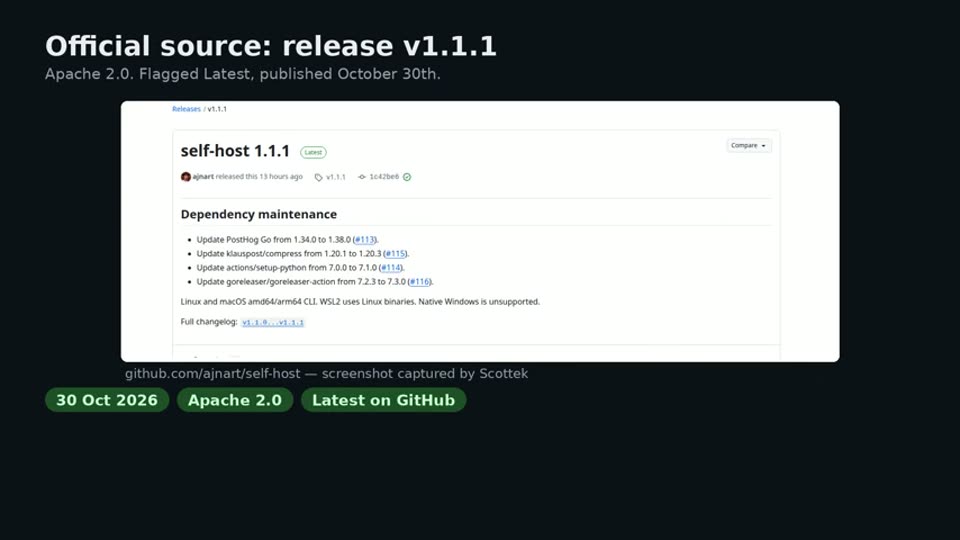
Added from the sources: the release page flags v1.1.1 as Latest, published October 30, 2026, with four dependency bumps and nothing else, under Apache 2.0. It ships Linux and macOS CLI binaries for amd64 and arm64, WSL2 uses the Linux binaries, and native Windows is unsupported. As of October 31 the latest redirect still lands on v1.1.1, so this article is pinned to the current release with no version drift.
- The docs site shows the same 93-app catalog the video describes, with familiar names like Immich, Jellyfin, Paperless-ngx, and Uptime Kuma.
- One honest split from the docs: the installer adds the CLI, and it does not deploy apps — deploys are a separate step with their own prerequisite.
Before you start: the Docker prerequisite
In the video: both the doctor check and the uptime-kuma install attempt end at the same guard telling the viewer to install Docker Engine first.
Added from the sources: the docs require Linux, macOS, or WSL2 with Docker Compose, and point at the Docker Engine install guide for the runtime. Plan on 64-bit Ubuntu 24.04 with Docker Engine plus the Compose plugin installed before any app deploy, alongside curl and tar which Ubuntu already ships.
- CLI-only steps like listing apps work without Docker, but every real deploy needs the Docker daemon running.
- If you want the one-line path instead of the archive below, the docs also offer an installer script with a published sha256, plus Homebrew, deb, rpm, apk, Docker-image, and from-source options.
The verified install sequence
In the video: the walkthrough downloads the release tarball and its checksums file, confirms the checksum, extracts the binary, moves it into user-local bin, adds that directory to PATH, and confirms with the version command. The terminal frames in this guide are recreated simulations of that recorded run, labeled as such on screen.
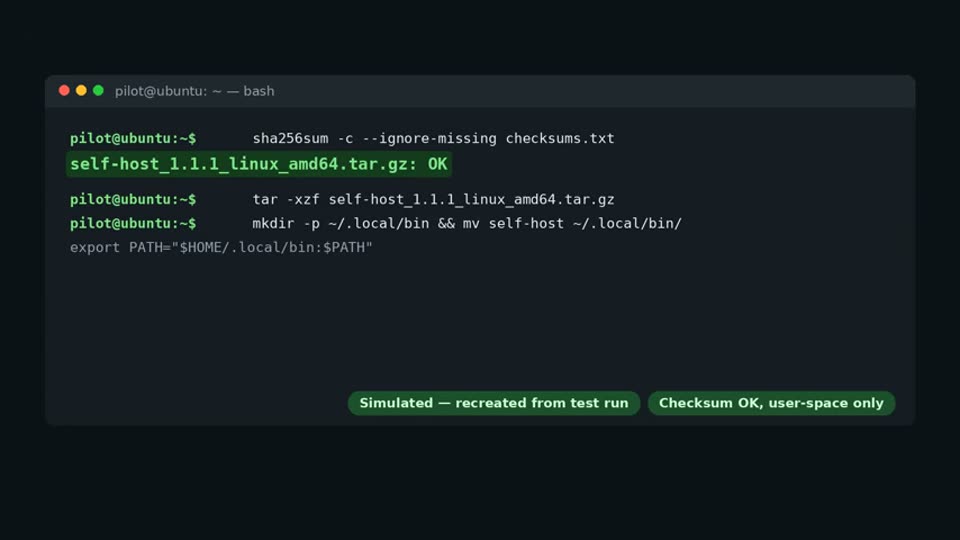
Added from the sources: the docs publish this exact release-archive flow, and both download URLs below returned HTTP 200 when checked October 31, 2026. Work in a fresh directory and run these in order, all untested here:
mkdir -p ~/self-host-setup && cd ~/self-host-setupkeeps the download tidy.curl -fsSLO https://github.com/ajnart/self-host/releases/download/v1.1.1/self-host_1.1.1_linux_amd64.tar.gzfetches the Linux amd64 archive.curl -fsSLO https://github.com/ajnart/self-host/releases/download/v1.1.1/checksums.txtfetches the checksum list.sha256sum -c --ignore-missing checksums.txtmust print OK for the tarball before you continue.tar -xzf self-host_1.1.1_linux_amd64.tar.gzextracts the binary.mkdir -p ~/.local/bin && mv self-host ~/.local/bin/installs it without sudo.export PATH="$HOME/.local/bin:$PATH"makes it visible in the current shell, and adding the same line to your shell profile keeps it permanent.self-host --versionconfirms the install, thenself-host apps list,self-host status, andself-host doctortour the catalog and check the machine.
Doctor, status, and the untested deploy
In the video: the doctor run reports the Docker command missing and points at Docker Engine, and the uptime-kuma install stops at the same guard instead of deploying anything.
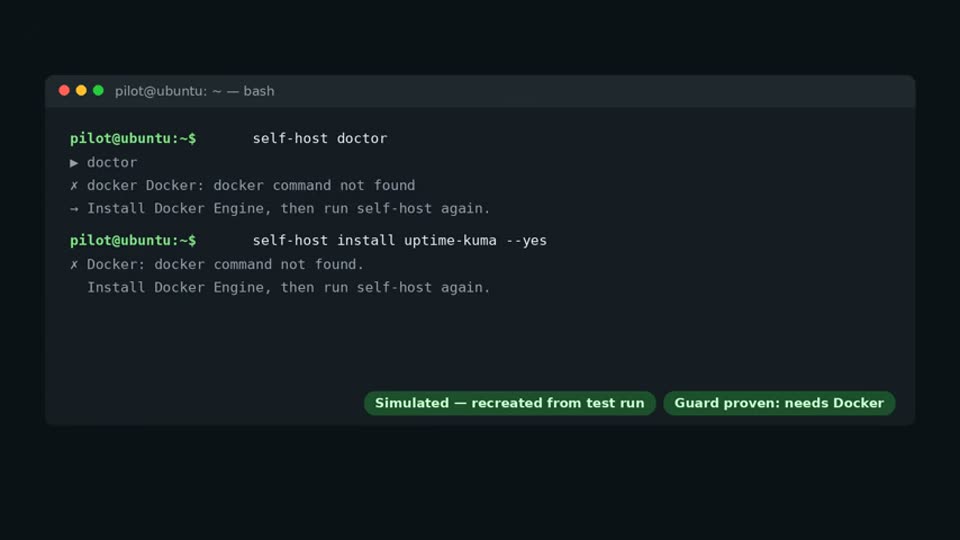
Added from the sources: per the docs, install shows a plan and waits for approval before touching anything, and the Uptime Kuma app page covers the example target. The docs-only deploy sketch, untested here because no Docker runtime was available:
- Review the plan first, then deploy the example with
self-host install uptime-kumaand approve it, or append--yesonly after you have read the plan. - If doctor flags Docker, install Docker Engine from the official guide, confirm the daemon is running, and rerun doctor before retrying the deploy.
- Keep the honest boundary: everything up to doctor is a verified download-and-inspect flow, while the container deploy itself was never shown running and stays untested here.