Install agent-desktop on Ubuntu: AI That Uses Your Desktop
This guide is the written companion to the video Install agent-desktop on Ubuntu: AI That Uses Your Desktop, and it treats the video as the starting point. Claims shown in the recording are labeled In the video, and everything I confirmed against the official project sources is labeled Added from the sources. Anything I could not independently verify is marked untested.
In the video: agent-desktop is the open computer-use command line from Vercel Labs, and it lets AI agents see and operate desktop apps through the accessibility tree instead of screenshots. Added from the sources: the official repository vercel-labs/agent-desktop describes the same idea, a CLI and C library for macOS, Windows, and Linux where a snapshot returns JSON with a ref for every element an agent can act on, the agent acts on a ref and snapshots again to check, and the observe-act-verify loop stays in the calling agent.
What the video covers
In the video: the full install and check takes under three minutes on Ubuntu 24.04, using npm, with version 1.0.2 shown in the version output. That version number and timing are video claims and are untested here, since I did not run the installer on Ubuntu myself.
In the video: you need Ubuntu 24.04 or newer, Node with npm, and a GNOME desktop session. Added from the sources: the official install documentation names Ubuntu 24.04 or later with GNOME 46 as the primary Linux target, with a glibc 2.35 floor, and notes that Ubuntu 22.04 fails on the older accessibility bridge.
In the video: the loop is simple, observe, act on a reference, then snapshot again to verify. Added from the sources: the project docs site teaches the same loop, map with a snapshot, act on a ref, then read the UI again, because a successful action alone does not prove the UI changed.
Before you install: the graphical session and the accessibility bridge
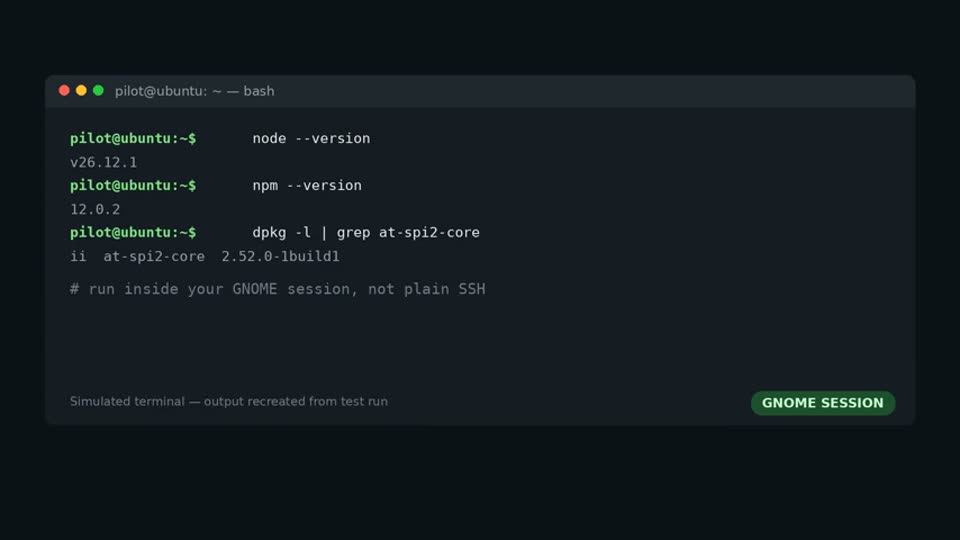
In the video: there are two Linux requirements. First, run everything inside your graphical session, because a plain shell or SSH connection without the session bus cannot see your apps. Second, you need the accessibility bridge package, which Ubuntu ships by default.
Added from the sources: the install documentation confirms both points. It says to run inside the user's graphical session with at-spi2-core installed, and warns that a TTY or SSH shell without that session's bus, display, and runtime environment cannot see its apps. It also says agent-desktop status activates and checks the accessibility bus.
Added from the sources: on Wayland there are two extras in the same install documentation. Wayland keys need GNOME Mutter RemoteDesktop, and the Wayland clipboard needs wl-clipboard. On X11, keys need XTEST. Semantic actions work on both X11 and Wayland, but on Wayland app pointer input refuses and native window control is unsupported.
- Confirm you are in a graphical GNOME session on Ubuntu 24.04 or newer, not plain SSH without the session bus
- Confirm
at-spi2-coreis present, which Ubuntu ships by default - On Wayland, plan for Mutter RemoteDesktop for keys and
wl-clipboardfor clipboard work
Install from npm on Ubuntu
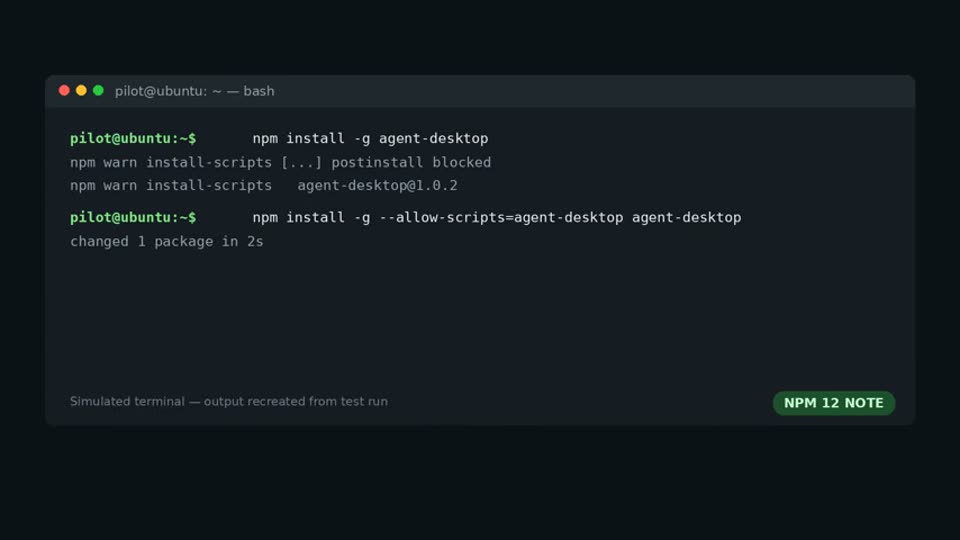
In the video: install with a global npm install of agent-desktop, which bundles the native binaries for 64-bit and ARM64 at about 29 megabytes. The binary size is a video claim and is untested here.
Added from the sources: the recommended Linux path in the repository README is npm install -g agent-desktop followed by agent-desktop version. The package includes native binaries and platform helpers for x64 and ARM64, and Bun, Yarn, and pnpm can install the same package. Matching native archives without the JavaScript launcher are also on the releases page.
- Run
npm install -g agent-desktopto install the CLI globally - If the command does not resolve afterward, check with
command -v agent-desktopand remove any older shadowing install through its original package manager - A non-global
npm install agent-desktoplands in./node_modules/.bininstead of PATH, so run it withnpx agent-desktopor install globally
In the video: on npm 12 the install script is blocked by default and you will see a warning, so approve it once with the allow-scripts flag and reinstall. Without it every command still works but each call starts slower.
Added from the sources: the install documentation confirms the mechanism with exact numbers. The postinstall script swaps the Node launcher for a link to the native binary at about 21 ms per call, while the fallback Node launcher costs about 146 ms per call. If scripts are blocked, approve with npm install-scripts approve agent-desktop or install with --allow-scripts.
Verify with version, status, and skills
In the video: run agent-desktop version and expect one JSON envelope with the version, your operating system, and your architecture, where exit code zero means the binary is healthy. The exact output shape is a video claim and is untested here.
Added from the sources: every CLI call prints one JSON envelope and exits, per the project docs site, and the full JSON contract lives in the JSON output documentation.
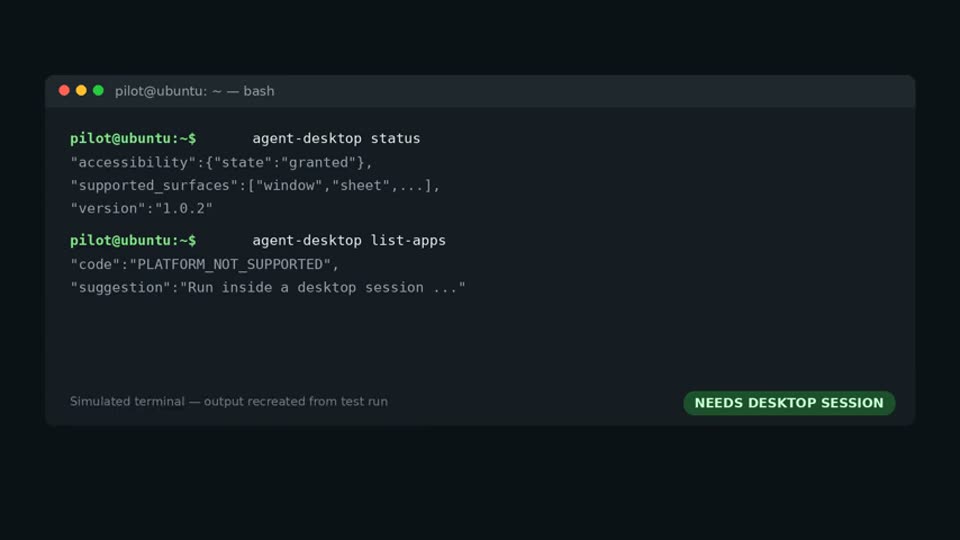
In the video: next run agent-desktop status, which talks to the accessibility bus and reports permissions, supported surfaces, and the state folder it created in your home. The state-folder detail is untested here. Added from the sources: the install documentation confirms that status activates and checks the accessibility bus.
In the video: on a headless box with no display, listing apps refuses cleanly and tells you to run inside a desktop session. That refusal wording is untested here, though it matches the documented requirement to run inside the graphical session.
- Run
agent-desktop versionto confirm the binary resolves and prints its JSON envelope - Run
agent-desktop statusto confirm the accessibility bus, permissions, and supported surfaces - Run
agent-desktop skills get linuxfor the full Linux capability table covering X11 and Wayland differences - Run
agent-desktop skills get desktopfor the main guide your agent should load before acting
Added from the sources: the project docs site lists the Linux platform requirement as Ubuntu 24.04 or later on x86-64 or aarch64 with a running AT-SPI bus, and the repository README summarizes Linux support as accessibility tree over AT-SPI, clipboard with wl-clipboard on Wayland, and launch plus list for app management with window control on X11 only.
Wiring it into your agent
In the video: wire agent-desktop into your agent with two lines in your agents file, or install the skill with npx. Both wiring details are untested here because the video does not show the file contents and I did not reproduce them.
Added from the sources: the project docs site is the canonical next step, with installation, quick start, skills, and command reference pages. The bundled skill text itself ships inside the binary and is printed by agent-desktop skills get desktop, so the installed CLI is its own reference.
- Point your agent at the output of
agent-desktop skills get desktopbefore it acts - Use
agent-desktop skills get linuxwhen the agent must know what works on X11 versus Wayland - Keep snapshots, clipboard reads, screenshots, and command output out of public logs, since they can contain private desktop content
Sources and next steps
- The companion video is the starting point for this guide and all In the video claims above
- The project repository owns the install command, platform table, and release process
- The install documentation owns the Linux requirements, blocked-script behavior, and Wayland notes
- The project docs site owns the observe-act-verify loop, the JSON envelope contract in plain language, and the next-step guides
- The JSON output documentation owns the exact envelope, error code, and exit code contract
- The releases page owns the native archives and checksums for installs without npm