24GB VRAM for Local AI: Why a Used RTX 3090 Still Wins (Oct 2026)

This guide is a companion to 24GB VRAM for Local AI: Why a Used RTX 3090 Still Wins (Oct 2026), and the video is the starting point for everything below. The video itself points here for the full tables and links, so the sections below are the written reference for what it walks through on screen. There is no separate research folder for this one, so this guide is built from the video plus official vendor and project documentation. Watch the video first for the narrated run-through. Video claims and added research are labeled throughout, prices are video-reported snapshots rather than live quotes, and anything not verified here is marked untested rather than stated as fact.
The one rule and the one number
- In the video: a model fitting in memory, a model running, and a model running at useful speed are three different things, and this guide keeps them separate.
- In the video: the buyer here runs local language models and wants 24 GB for larger quantized models, bigger context, or cleaner offload-free setups, with US pricing in dollars before tax.
- Added from the sources: NVIDIA's RTX 3090 page confirms the card is Ampere with a staggering 24 GB of G6X memory, which is the ceiling this whole comparison is about.
- In the video: all prices were checked October 22nd, 2026, used prices move weekly, and you should recheck current sold listings before you bid, so treat every dollar figure below as a dated snapshot, not a live quote.
What buyers are actually paying
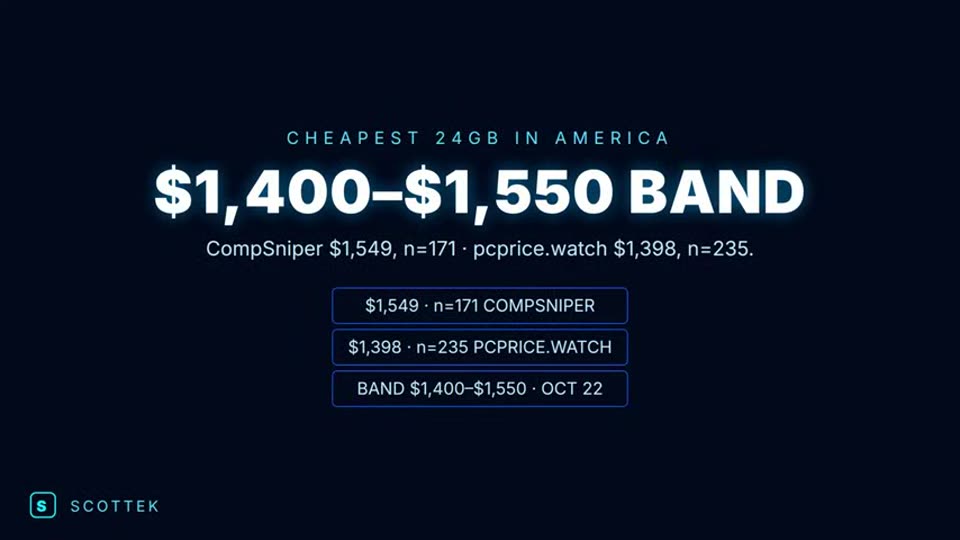
- In the video: sold prices, not asking prices, where the used RTX 3090 24 GB shows a CompSniper median of $1,549 across 171 sales against a pcprice.watch average of $1,398 across 235 sales over 90 days, carried as a band of roughly $1,400 to $1,550 and about $64.50 per GB.
- In the video: the used RTX 4090 24 GB has the same ceiling for very different money, reported as roughly $2,600 to $3,200 across trackers that disagree on small samples, so about twice the 3090 for the same capacity where you pay for speed, not capacity.
- In the video: asking is not value, since live buy-it-now rows sit right on the sold median, anything far under $1,400 is usually still an auction, and clean buys need real photos, high-feedback sellers, and free returns.
- In the video: one defensible hero example is a high-feedback seller card near $1,400 with free shipping, while nothing clean shows under about $1,099 and the top price quartile is premium AIB models and bundles rather than the market.
- Untested here as live market data: none of the above was re-quoted for this guide, and trackers disagree on methods and windows, so the bands are the honest unit, not any single median.
What actually fits in 24 GB
- In the video: a 32B model at Q4 is an 18.4 GB file loading about 20.5 GB at 4K context and about 27.5 GB at 32K context, so a 27B at Q4 runs comfortable on 24 GB while 32B is the edge: fine at short context and tight at long context.
- In the video: a VRAM calculator agrees that the same models fit a 3090 and a 4090 with an identical ceiling, and the 4090 lead is speed only, at roughly 1.4x at 14B and about 34 versus 29 tokens per second at 30 to 35B with mixed-rig caveats.
- In the video: never let anyone sell you gaming FPS as inference speed, since those are different workloads with different math.
- Untested here as benchmarks: the VRAM loads and token rates above are video-reported figures rather than runs reproduced for this guide.
The new-card alternative
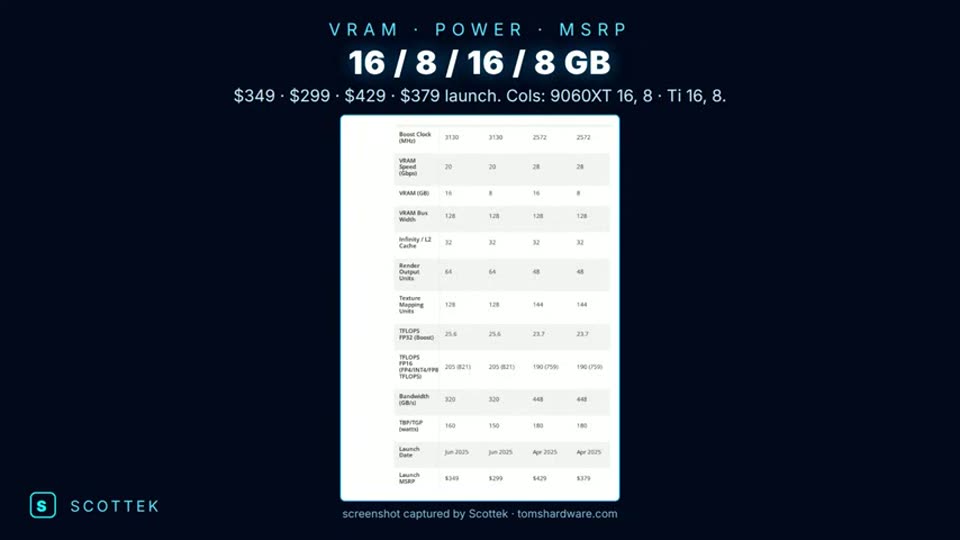
- In the video: for smaller-model runners, a new Sapphire Pulse RX 9060 XT 16 GB at $519.99 and an ASUS dual RTX 5060 Ti 16 GB around $800 cover 14B quants and lighter 32B offload setups with a warranty and zero marketplace risk.
- Added from the sources: the comparison table shown in the video lists launch pricing of $349 and $299 for the 16 GB and 8 GB 9060 XT against $429 and $379 for the 16 GB and 8 GB 5060 Ti, all on 128-bit buses, which frames why these are capacity compromises rather than 24 GB substitutes.
- In the video: 16 is not 24, so if your target is a full 32B at Q4 with real context, these are not substitutes.
- Check current retail before acting: launch MSRPs above are reference points, and street prices move.
Compatibility, power, and marketplace hygiene
- In the video: llama.cpp builds for the 3090 CUDA target, the Ollama Q4 default path just works, and vLLM runs Ampere in its stable Docker image with the documented serving flags, with versions checked at build time.
- Added from the sources: the projects to check versions against are llama.cpp, the Ollama docs, and the vLLM docs, since flags and images move and a guide that skips versions should be verified before you trust it.
- In the video: GDDR6X junction temps run hot and sustained junction over 100 is a return flag, triple-fan AIB cards stay quiet while blowers and OEM pulls run loud, and the card is 350 W board power on a 750 W PSU minimum with two separate 8-pin cables into the 12-pin adapter, where owners call 850 to 1,000 W the comfortable zone in a three-slot, 12.3-inch card that you must measure your case for.
- In the video: EVGA cards have no manufacturer warranty path anymore, so price them as no-warranty regardless of brand nostalgia, and test on arrival with a stress test plus a VRAM-heavy workload under day-one return limits.
- In the video: marketplace hygiene means 99-plus percent feedback with triple-digit counts, actual photos of the exact card, timestamped photos on peer markets, PayPal goods and services only with no crypto, and questions on temps, fan behavior, and repaste history, since nobody discloses mining history and you verify regardless.
Verdict: who should buy what
- In the video: the best value for the stated buyer is a used RTX 3090 near $1,450 to $1,550 from a high-feedback US seller with free returns, giving the 24 GB ceiling at the best dollars-per-GB in the country.
- In the video: skip past $1,600, skip zero-feedback sellers, skip OEM blowers unless cooling is your project, and consider a used 4090 only if your bottleneck is tokens per second rather than capacity and you accept roughly double money for the same ceiling.
- In the video: the lowest-risk alternative is a new 16 GB card if your models fit in 16, and the reason to wait is anything new with 24 GB plus any used 3090 over budget, with alerts set near the sold median so auctions come to you.
- This article contains no affiliate links.