FLUX 3 Klein: Local AI Images on 8GB VRAM (2026 Guide)

Companion starting point
This guide is a companion to the video, which is the starting point for everything below. Watch the video first, then use this page as the written reference with links to the official sources.
- In the video: a roughly 12-minute setup guide to running the FLUX 3 Image Klein model locally on a modest 8GB VRAM card, covering what shipped, where the 8GB claim holds, vendor speed and quality figures, the ComfyUI install path, and honest limits. The presenter states plainly that no local generation run was done on camera for this day-one release, so every performance and quality number below is a labeled vendor figure, not an independent bench, and the install steps are untested here.
- Added from the sources: the BFL release post, the ComfyUI FLUX 3 Klein tutorial, and the ComfyUI weights repo. The auto-sub transcript (274 cues collapsed, read in full) matches the Prag production script closely, so video claims below rest on both.
What shipped: one model, two checkpoints
- In the video: Black Forest Labs released FLUX 3 Image Klein on October 15, 2026, a 5.6-billion-parameter open-weights image model doing text-to-image, photo editing, and multi-reference builds with up to ten source pictures, with native 4K output, bounding boxes, and pixel-perfect touch-ups. Two checkpoints ship together: a full base build for fine-tuning and a step-distilled build for fast everyday generation, both handling generation and instruction-driven editing from the same weights. Quantized builds ship alongside in FP8, INT8, and NVFP4, developed with NVIDIA, and the weights live on Hugging Face under the FLUX Kommunity License.
- In the video: pick the checkpoint before downloading anything. Base is the research build at 50 steps with guidance at 3.5, and it is the one LoRA training targets, with Ostris AI Toolkit and NVIDIA NeMo recipes plugging straight into it. Distilled is the daily driver at 4 to 16 steps with guidance locked at 1, tuned for low-latency runs, and raising guidance on distilled will not help, by design rather than by bug. Generating this weekend means distilled, while teaching the model a style means base.
- Added from the sources: the BFL post confirms the 5.6B label refers to the image transformer with the text encoder counted separately, and that Klein is the second open release from the FLUX 3 family after the FLUX 3 Action robotics model. Training ran on NVIDIA GB200 NVL72 hardware, and serving a LoRA adds around 5 percent to generation time, which is a vendor figure. Day-one tooling also covers Diffusers, TensorRT-LLM, SGLang Diffusion, and vLLM-Omni, plus reference inference code with a Gradio bounding-box demo.
The 8GB claim, honestly
- In the video: the generator weights take 11.2 GB in BF16 and 5.6 GB in FP8, and the 8GB floor belongs to one specific build, the INT8 checkpoint running in ComfyUI or Diffusers on an RTX card, with the 3070 class cited as the example. That floor is not the reference FP8 code, not every variant, not 4K output, and not ten-reference monster workflows on a small card, and no 8GB 4K speed figure is published. The optional prompt upsampler adds another 9.8 GB on disk, so on an 8GB card it stays off at first. The verdict is yes, 8GB is real, but only on the INT8 ComfyUI recipe.
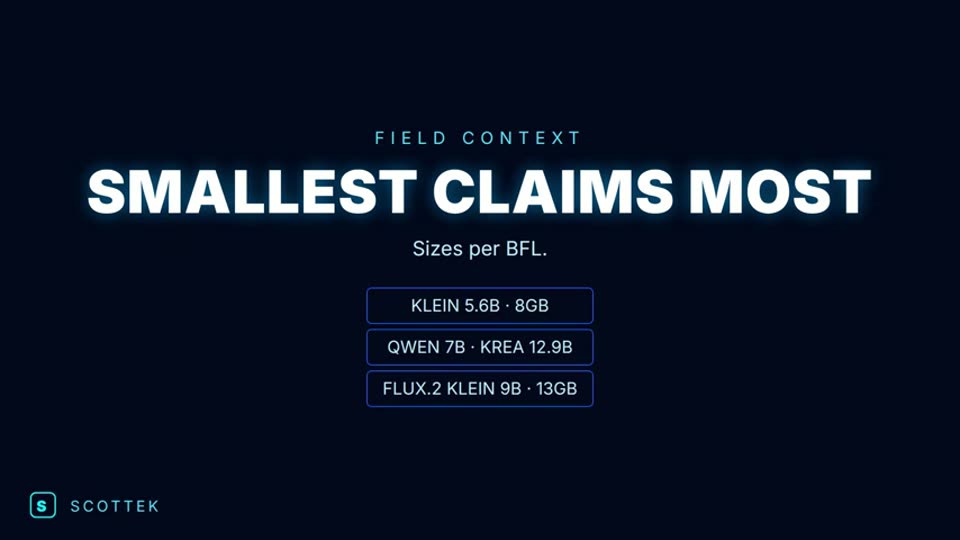
- Added from the sources: the repo file table prices each piece, with the distilled INT8 checkpoint at 5.8 GB, the base INT8 checkpoint at 5.8 GB, the INT8 text encoder at 4.9 GB, the VAE at 0.3 GB, and the upsampler at 6.7 GB in w4a8 or 9.8 GB in INT8. The same page notes the INT8 files also suit GPUs without FP8 support such as the RTX 30 series and older, while NVFP4 needs a Blackwell GPU.
Speed: vendor figures, labeled
- In the video: the label comes first, since these are BFL and NVIDIA figures rather than a benchmark the presenter ran. Distilled INT8 at 16 steps on a one-megapixel image, one image per run, in ComfyUI, lands at about 4 seconds on a 5090 and under 9 seconds on a 4070, while a GB300 datacenter card in NVFP4 slips under six-tenths of a second. The base 50-step checkpoint is much slower, which is expected since it is the fine-tuning path rather than the daily driver. Treat these as best-case per-GPU vendor builds, then test with your own prompts after installing.
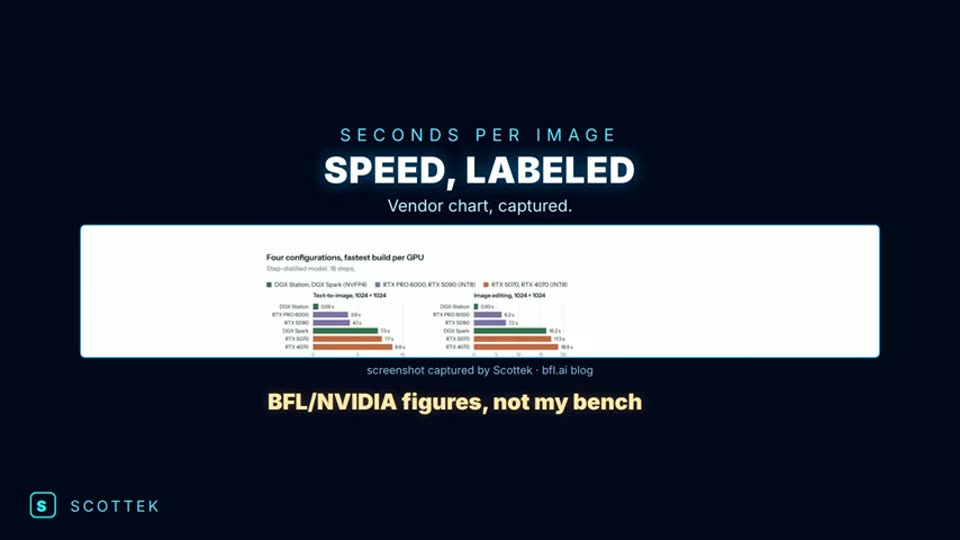
- Added from the sources: the BFL charts carry the methodology in their captions, with RTX results measured in ComfyUI by NVIDIA and each GPU showing its quickest build. API latency is a separate figure, with Klein at 4.54 seconds for text-to-image and 7.18 seconds for editing at one megapixel end to end including queueing, and the post warns the methodology differs because Klein was timed on BFL servers while other models were client-timed. All of these numbers are untested here, and no independent benchmarks existed at this day-one record time.
Quality: vendor internal, labeled
- In the video: quality claims get the same labeled treatment. In BFL's own internal evaluations, Klein ranks first among open-weights models in text-to-image, multi-reference, and editing, above Qwen-Image 2.1 at 7 billion parameters and Krea 2 at nearly 13 billion, and above the closed Ideogram V4.5 and FLUX.2 Pro in their comparison. Against the previous round's FLUX.2 Klein at 9B, BFL reports plus 91 Elo in generation and plus 70 in editing with 38 percent fewer parameters, generator only with text encoders excluded, where Elo means pairwise-judgment wins under their judging. Promising but not independently proven, so judge with your own images.
- Added from the sources: the BFL post adds an API speed-quality Pareto claim, with Klein at lower latency than Qwen-Image 2.1, FLUX.2 Pro, Ideogram V4.5, and Krea 2 at the top rating, subject to the same timing-methodology caveat above. The Prag research notes add that announcement coverage did not tie the 8GB minimum to a variant, size, or time, and that the charts do not test 8GB cards or 4K output, which matches the honest framing in the video.
The ComfyUI path: version, templates, files
- In the video: the front door is ComfyUI updated to 0.41.0 or later, since the Klein templates rode in on the 0.41.1 backport. The template library carries ready-made workflows for full text-to-image, distilled text-to-image, image edit, and distilled edit, plus multi-reference variants. The distilled text-to-image template runs 15 steps with prompt upsampling on by default, so a short description is enough, while full text-to-image defaults to 25 steps at guidance 3.5 with a docs note to try 50 for quality. Load the template, point it at your files, hit Queue, and collect the result from the output folder.
- Added from the sources: the ComfyUI tutorial currently shows 50 steps as the full text-to-image default and 16 steps for the distilled template, so confirm the defaults in your installed build since templates move between versions. The tutorial requires ComfyUI 0.41.0 or later and notes missing templates or nodes mean the install is stale, updating to nightly if needed.
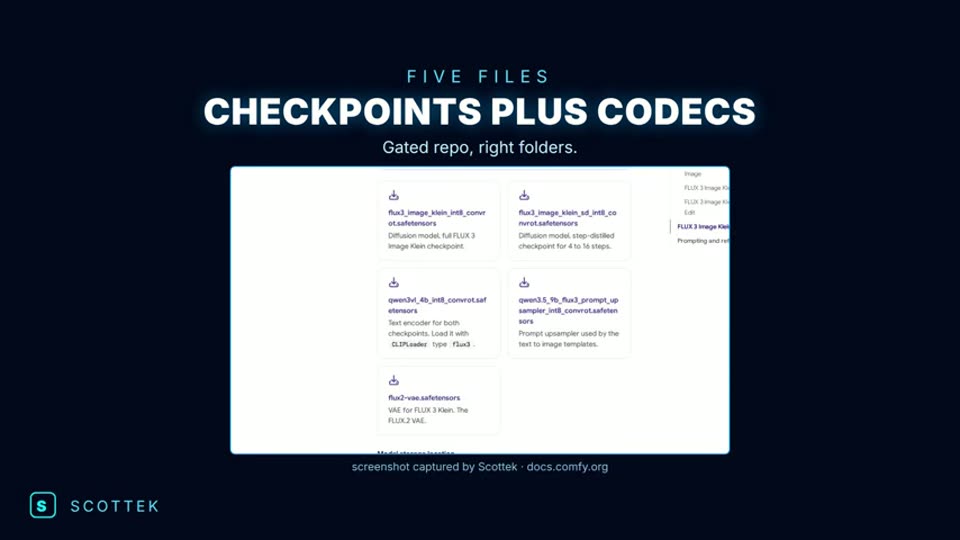
- In the video: downloads live in the gated Hugging Face repo, so open it, accept the license, then pull the diffusion checkpoint (distilled INT8 for the fast path, full INT8 for the base path), the Qwen3-VL-4B text encoder that reads the prompt, and the FLUX.2 VAE that turns latents into pixels. All in for distilled INT8 means roughly 11 GB of model files plus encoder and VAE. Each file belongs in the folder its workflow expects, meaning diffusion models, text encoders, and VAE, since a misplaced file is the number-one day-one support ticket.
- Added from the sources: the exact filenames from the ComfyUI weights repo are
flux3-image-klein-int8-convrot.safetensorsfor distilled,flux3-image-klein-base-int8-convrot.safetensorsfor base,qwen3vl_4b_int8_convrot.safetensorsfor the encoder loaded withCLIPLoadertypeflux3,qwen3.5_9b_flux3_prompt_upsampler_w4a8.safetensorsfor the optional upsampler, andflux2-vae.safetensorsfor the VAE. The docs add that with more than 24 GB of VRAM you can swap in the BF16 builds of the same checkpoint plus the BF16 upsampler for closer long-prompt following.
Prompting and edits that work
- In the video: three habits from the official guide save an evening. First, for edits write the finished picture as a full caption with the change folded in, since the templates expect a description of the result rather than a terse order. Second, references attach in order through Set Reference Multi Latent and join both conditionings, with the first image as ref image zero and the next as ref image one, each belonging in both prompts the way the template wires it. Third, reference size is the cost dial, with templates landing around a megapixel while BFL's own pipeline goes much higher, so bigger references keep more detail at a higher price. A Create Bounding Boxes node sketches regions over the source for planned edits.
- Added from the sources: the repo prompting guide insists on always running a prompt upsampler, whether the bundled one or another LLM, because the model takes full scene captions and a short prompt sent as typed gives generic output. Boxes sit on a 0 to 1000 grid and guide placement and scale rather than constraining pixels to a hard mask, and the stated limitations add that small requested elements may not appear and edits can change content outside the requested region.
License, safety, and the hosted alternative
- In the video: the FLUX Kommunity License allows free commercial use for individuals and companies under 5 million in annual revenue, plus research and non-commercial use, while bigger organizations talk self-hosted licensing or the API. That is friendlier than many open-weights image terms and fits small studios, homelabs, and local pipelines with data-sovereignty needs. On safety, BFL cites dataset filters, an internal red-team, and an external review by Cinder, stated as their claim from their testing.
- In the video: skipping the download is legitimate, since the distilled model also runs hosted through the BFL API with prompt upsampling and pixel restoration baked in, at per-image pricing starting at 0.009 dollars per 1K image per the blog, alongside a Playground and a Hugging Face Space for quick tries. The honest math is that the API is cheap per image with zero setup while local is free per image after the download and private forever, so try the Space in five minutes and then decide whether the download earns its disk.
- Added from the sources: the model card license section frames the terms as non-commercial use plus a commercial-output exception for qualifying users under 5 million in gross annualized revenue including affiliates, so consult the full license text for the terms on each use. If Klein's download feels heavy, a different local image path is the channel's Unsloth Studio image guide, which covers 8-step generation with a 4 GB-class quant as an alternative way onto a small card.
The 8GB recipe and three gotchas
- In the video: the build checklist runs update ComfyUI to 0.41.1 or newer and confirm the Klein templates appear, accept the gated repo terms and pull the distilled INT8 checkpoint plus the Qwen3-VL-4B encoder plus the FLUX.2 VAE while skipping the upsampler, load the distilled text-to-image template with a short prompt on a one-megapixel canvas at 12 to 16 steps with guidance at 1 and the upsampler off, then queue. Expect single-digit to low-double-digit seconds on a mid-range RTX for the first run while shaders compile and caches warm, then it settles. Follow with one edit by loading a photo as reference zero and describing the finished result, and two successful queues prove the whole pipeline on your card. These steps are untested here since no local run was logged for this release.
- In the video: three traps come from somebody's real evening. First, files in the wrong folder, since the diffusion checkpoint, text encoder, and VAE each have their own directory and a misplaced file becomes a silent missing-node mystery. Second, stale ComfyUI, where missing Klein templates or nodes mean updating past 0.41 first. Third, ambition, because 4K canvases and ten-reference stacks on an 8GB card will remind you what VRAM limits feel like, so start at a megapixel and spend memory on purpose. The free bonus fourth is closing the game, the forty-tab browser, and the other GPU app, since eight gigabytes is a room rather than a ballroom.
Verdict
- In the video: with 8 GB of VRAM and a history of being locked out of local image models, the distilled INT8 build is the invitation back in, genuinely local, genuinely editable, and genuinely yours. For fine-tuning or LoRA training, the base checkpoint plus the day-one tooling is the more interesting half. On quality versus the field, BFL's internal numbers are strong but they remain BFL's, so run your prompts, photos, and references and judge with your eyes.
- Added from the sources: for the upgrade question, FLUX.2 Klein needed around 13 GB while Klein pushes the same idea to 8 GB with claimed better quality on fewer parameters, but keep the old checkpoint until your own side-by-sides confirm the switch. File names, repo links, and template names above all trace to the linked official docs, and the install recipe stays marked untested until a local run confirms it.