Unsloth NPU Support: Your Laptop's Idle AI Chip Gets a Job

Companion to the video
This guide is a companion to Unsloth NPU Support: Your Laptop's Idle AI Chip Gets a Job, a 215-second video covering the November 19 2026 announcement with the documented setup, the memory math, and the fine print. The announcement is real and recent, and the setup below is documented from the official guide, not run here. There is no XDNA 2 hardware on this bench, so nothing here is a bench test. Auto-subtitles were attempted once via yt-dlp and were unavailable, so the transcript basis for this guide is the video description, disclosed here. For the desktop-GPU counterpart to this laptop-NPU story, see the desktop-GPU counterpart guide.
What was announced
On November 19 2026, AMD and Unsloth announced NPU support in Unsloth Desktop, the first time AMD XDNA 2 NPUs run local models for more than 100 agentic apps. The AMD Newsroom announcement frames it as local inference on Ryzen AI PCs through one OpenAI-compliant API endpoint. The AMD blog walkthrough adds the setup path and the memory math. The Unsloth AMD NPU setup guide is the install reference.
Named app support includes tools such as Hermes Agent, Open WebUI, Cline, LangChain, OpenClaw, and GitHub Copilot, served through Lemonade plus FastFlowLM. Stated plainly, this is a documented launch, and every speed in this guide is labeled as the vendor's reported figure.
Requirements
The supported surface comes from the official guide, and all of it is documented, not verified here.
- Supported chips are Ryzen AI 300, Ryzen AI Max, and Ryzen AI 400, per the Unsloth AMD NPU setup guide
- Windows 11 or 64-bit Linux, per the Unsloth AMD NPU setup guide
- On Linux, kernel 7.0 or newer with in-tree
amdxdna, oramdxdna-dkms, plus current firmware and unlimited memlock, per the Unsloth AMD NPU setup guide - Unsloth Desktop for Windows on the Windows path, per the AMD blog walkthrough
- Enough shared system memory for the model you want, with the 35B mixture model needing about 28GB NPU-available as guide arithmetic, per the AMD blog walkthrough
Documented setup, not run here
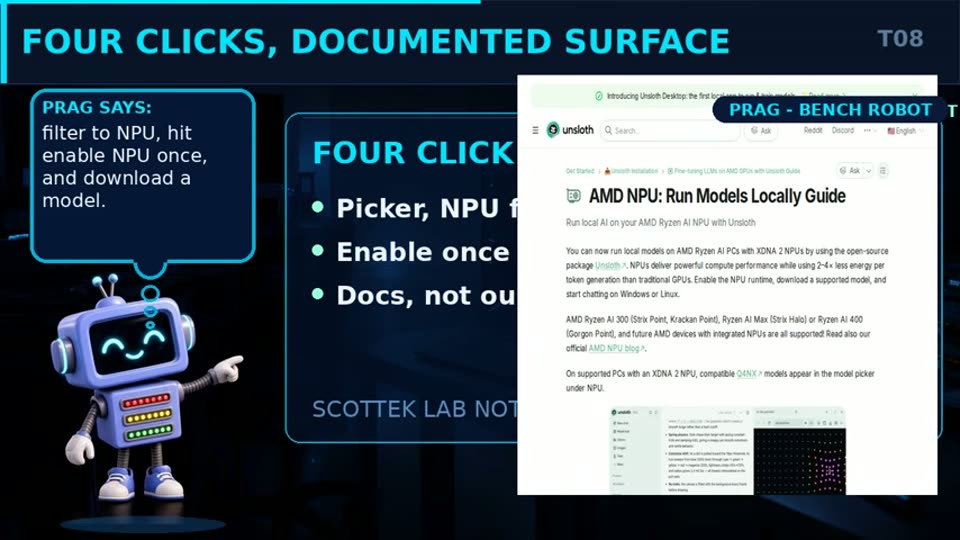
This is the four-click path from the official guide, carried here as documented surface. Every step below is untested here because there is no NPU hardware on this bench.
- Install and open Desktop for Windows, untested here
- Open the model hub and filter to NPU models, untested here
- Select NPU and choose Enable NPU, untested here
- Download an NPU model build and run it, untested here
The documented CLI path from the official guide uses unsloth run --model Qwen3.6-35B-A3B-NPU2 --context-length 16384, also untested here. Features listed in the docs include streaming, reasoning, vision, tools, MCP, web search, and local files, all documented and none run here. Power modes listed are saver, balanced, performance, and turbo, with performance as default and lower output expected on battery.
Reported speeds, all Unsloth figures
Every number in this section is an Unsloth reported figure, meaning vendor-claimed speed with chip and power mode unattributed. None of these were measured here.
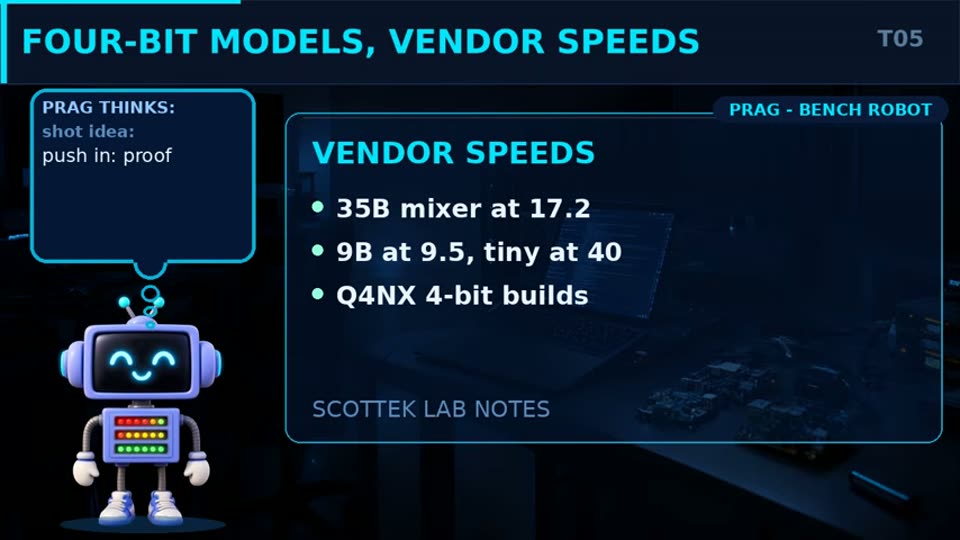
- Qwen 35B mixture model at 17.2 tokens per second with 3.13 second time to first token, Unsloth reported figure
- Qwen 27B dense model at 2.0 tokens per second, Unsloth reported figure
- Gemma 12B instruction model at 6.8 tokens per second, Unsloth reported figure
- Qwen 9B model at 9.5 tokens per second, Unsloth reported figure
- LFM 1.7B small model at 40.7 tokens per second, Unsloth reported figure
Model sizes and recommended system memory below are also from the research notes, carried as documented sizing rather than bench results.
- 35B mixture at 20.6GB with 64GB recommended, Unsloth reported figure
- 27B dense at 18.1GB with 48GB recommended, Unsloth reported figure
- 12B instruction model at 8.7GB with 32GB recommended, Unsloth reported figure
- 9B model at 7.6GB with 32GB recommended, Unsloth reported figure
- 1.7B model at 1.5GB with 16GB recommended, Unsloth reported figure
Why 64GB matters, guide arithmetic
The 64GB guidance is guide arithmetic, not a measurement. The full-context 35B mixture model needs about 28GB NPU-available, and Windows defaults to about 50 percent shared allocation, so a 64GB system lands near that need. That is the AMD blog walkthrough math, and it is the purchase decision in one line. Buy 32GB and the big mixture model does not fit the NPU path, while the smaller models still do. Buy 64GB and the flagship NPU model enters the picture, still at Unsloth reported figures for speed.
Bandwidth wall, not TOPS
The slow 27B dense result is the lesson. That 2.0 tokens per second is an Unsloth reported figure, and the guide-side explanation is a memory bandwidth wall rather than a TOPS shortfall. Dense models move all their weights for each token, so a narrow NPU memory path throttles them. Mixture models activate a fraction of weights per token, so the same narrow path goes further, which is why the larger 35B mixture model posts the faster Unsloth reported figure. TOPS sell the chip, while sustained memory bandwidth decides token speed on it.
Fine print
- All speeds are unattributed vendor claims with no stated chip or power mode, so treat them as Unsloth reported figures only
- The 27B dense crawl at 2.0 tokens per second is an Unsloth reported figure showing dense models hit the bandwidth wall on this path
- No Intel or Qualcomm NPU support is announced, so this is AMD XDNA 2 only for now
- The efficiency line of less energy per token than GPUs is a vendor claim with no published comparison setup, carried here as unattributed
- The setup path, requirements, and memory math are documented surface from the official guide, all untested here with no NPU hardware on this bench
Open questions
- When, if ever, Intel and Qualcomm NPUs join this path
- Independent token-speed runs on known chips and power modes, since current speeds are Unsloth reported figures
- Independent energy-per-token testing with a published setup, since the efficiency line is currently unattributed
- Battery versus plugged behavior across saver, balanced, performance, and turbo modes
- How the 100-plus app integrations behave in daily agentic use rather than launch-list form
Verdict
If you already own a supported Ryzen AI laptop with roomy memory, this is a free new capability worth trying through the documented path. If you are buying for local agents today, 64GB is the sensible floor for the flagship NPU model, with smaller models as the fallback on 32GB and 16GB systems. Until independent runs land, hold the speeds as Unsloth reported figures and judge the launch on what it unlocks rather than how fast it claims to be.