FFmpeg 9.1 "Gauss": Compile It Yourself on Ubuntu

This guide is the written companion to the video FFmpeg 9.1 Gauss: Compile It Yourself on Ubuntu (105s, uploaded 2026-11-20), and it treats the video as the starting point. Claims shown in the recording are labeled In the video, and everything confirmed against the official FFmpeg sources is labeled Added from the sources. Anything not independently confirmed is marked untested here.
The auto-subtitle fetch failed with HTTP 429, so the video record used here is the owner-written video description, disclosed as such. There is no Prag research folder for this video, so this guide is built from that description record plus the official sources re-verified live. The duration was confirmed at 105 seconds with yt-dlp, so this is a short but full compile guide rather than a Shorts teaser. No local compile was run on this box, which has no sudo, so all docs-voiced build steps below are untested here. The figures below are stills of the video frames.
What the video covers
In the video: Ubuntu 24.04 64-bit with sudo, about 2 GB free, and internet access is the starting point, because the Ubuntu repo still ships 6.1.1 while this walkthrough builds the latest 9.1 release with x264, x265, VP9, MP3, Opus, AV1, dav1d, and subtitles. The description-record steps are installing the toolchain and codec libraries, downloading the official tarball from ffmpeg.org, configuring with GPL plus eight external libraries, compiling on all cores in about 8 minutes on 4 cores with that wait compressed in the video, installing to /usr/local, then verifying with ffmpeg -version, the encoder list, and a real 3-second H.264 transcode. The 8-minute figure, the encoder lineup, and the transcode check are video claims and are untested here.
Added from the sources: the FFmpeg download page confirms 9.1 Gauss was released on 2026-11-20 as the latest stable release from the 9.1 branch cut from master on 2026-10-24, with libavutil 61.19.100, libavcodec 63.24.100, libavformat 63.16.100, libavdevice 63.5.100, libavfilter 12.8.100, libswscale 10.5.100, and libswresample 7.6.100. Added from the sources: the 9.1 changelog section lists release highlights including ASTC image encoding and decoding, an extensively improved AAC encoder, and an APV Vulkan encoder, so 9.1 is a feature release and not a rename of the repo copy.
Why the repo copy is not enough
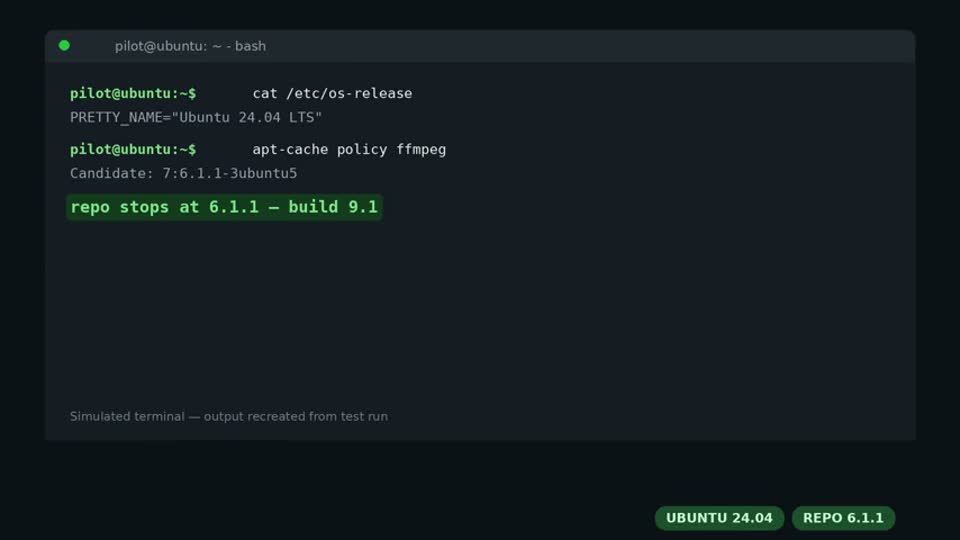
In the video: the walkthrough frame shows cat /etc/os-release answering Ubuntu 24.04 LTS and apt-cache policy ffmpeg answering candidate 6.1.1, which is why the guide builds from source instead of installing the repo package. The exact 6.1.1 candidate string is a video-frame claim repeated here as given and is untested here.
Added from the sources: the Ubuntu compilation guide states the same premise directly, noting FFmpeg is part of the Ubuntu packages yet compiling is still worthwhile for the latest version, a bug fix, or a customized build. The guide is designed to be non-intrusive and keeps source and build trees in the home directory, which matches the install-to-/usr/local approach that avoids clobbering the repo install.
- Stay on 64-bit Ubuntu 24.04 with sudo, about 2 GB free, and internet before starting
- Expect the repo candidate to lag the current release, which is the reason to compile
- Keep the repo package and the compiled copy separated via the
/usr/localprefix
Get the toolchain and the official tarball
In the video: install the toolchain and codec libraries first, then download the official release tarball from ffmpeg.org. The exact install command line is not spelled out in the description record and is untested here.
Added from the sources: the Ubuntu compilation guide gives the dependency install as sudo apt-get update -qq followed by sudo apt-get -y install with the compiler and codec development packages including build-essential, yasm, nasm, pkg-config, libmp3lame-dev, libopus-dev, libvpx-dev, libx264-dev, libx265-dev, and libass-dev, plus mkdir -p ~/ffmpeg_sources ~/bin for the source and binary trees. Server users may omit the ffplay display dependencies per that same guide. Added from the sources: the FFmpeg download page is the canonical source for the release, and the official xz tarball ships alongside PGP and PQ signatures, with Git access via git clone https://git.ffmpeg.org/ffmpeg.git ffmpeg for those who prefer the tree. Every command in this section is untested here since no sudo compile was attempted on this box.
- Run
sudo apt-get update -qqbefore installing the toolchain per the wiki guide - Run the wiki
sudo apt-get -y installdependency line for the compiler and codec development packages - Run
mkdir -p ~/ffmpeg_sources ~/binfor the wiki source and binary trees - Download the official xz tarball rather than a mirror or repack
Configure with GPL plus eight external libraries
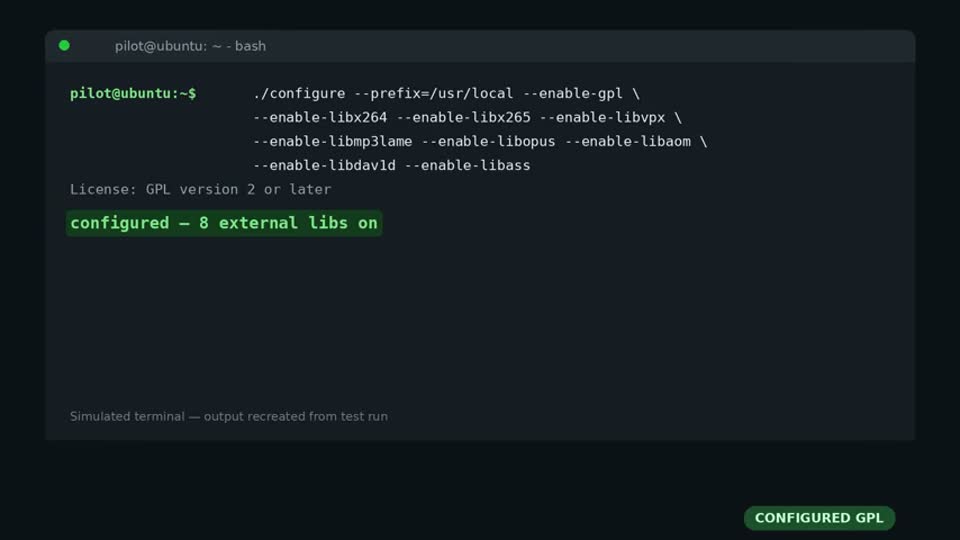
In the video: the walkthrough frame shows ./configure --prefix=/usr/local --enable-gpl with --enable-libx264, --enable-libx265, --enable-libvpx, --enable-libmp3lame, --enable-libopus, --enable-libaom, --enable-libdav1d, and --enable-libass, answering back License GPL version 2 or later. That flag set is a video-frame claim repeated here as given and is untested here. The eight-library count matches the description record of GPL plus eight external libraries.
Added from the sources: the Ubuntu compilation guide follows the same pattern of enabling one external library per --enable-lib flag after its section is built, and the FFmpeg download page notes FFmpeg only ships source while packagers and local builds decide which external libraries to turn on. GPL-gated encoders such as x264 and x265 require the --enable-gpl form shown in the frame, and that licensing consequence is why the frame license line matters. This configure line is untested here.
- Configure with
--prefix=/usr/localto keep the new build out of the repo paths - Pass
--enable-gplwhen enabling GPL-gated libraries such as x264 and x265 - Enable each external library with its own
--enable-libflag as shown in the frame - Confirm the license line answers back GPL before compiling
Compile, install, and verify
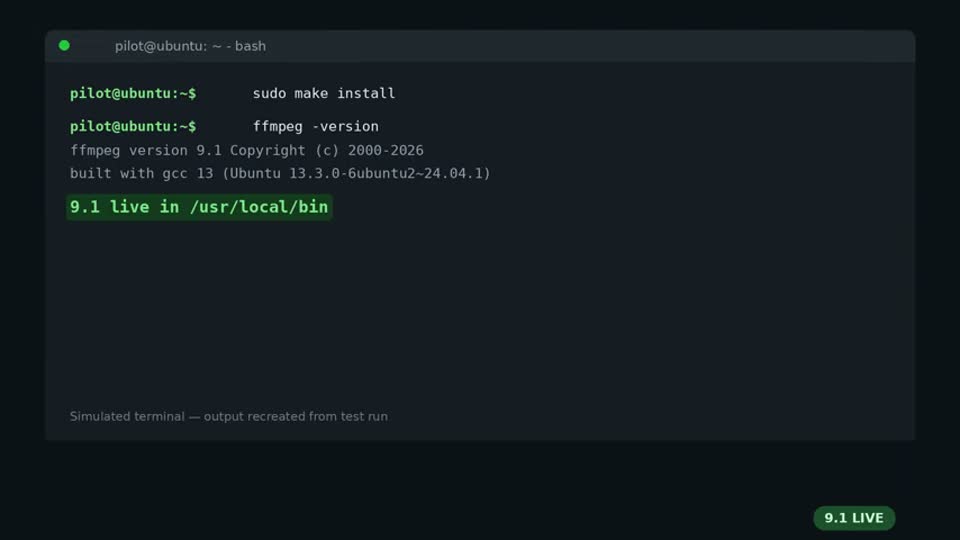
In the video: the compile runs on all cores in about 8 minutes on 4 cores with the wait compressed, then sudo make install lands the build in /usr/local and ffmpeg -version answers 9.1 built with gcc 13. The walkthrough frame shows exactly that install plus version pair with a 9.1 live note. The timing, the gcc string, the encoder-list check, and the 3-second H.264 transcode are video claims and are untested here.
Added from the sources: the Ubuntu compilation guide uses the same verify-first habit of checking the built binary before trusting the install, and the 9.1 changelog section is the reference for what a correct 9.1 binary should report. If the shell still answers the old version after install, the usual cause is path order between /usr/local/bin and the repo binary path, so check which ffmpeg ordering. That troubleshooting note is general Linux behavior and is untested here.
- Compile on all cores per the video walkthrough and expect several minutes on a small host
- Run
sudo make installto land the build under/usr/local - Run
ffmpeg -versionand confirm it answers 9.1 - Run the encoder list and the 3-second H.264 transcode from the video as the proof pass
Sources and next steps
- The companion video is the starting point for this guide and all In the video claims above
- The FFmpeg download page owns the 9.1 Gauss release date, the branch cut, the library versions, and the tarball links
- The official xz tarball owns the exact bytes to build
- The 9.1 changelog section owns the release highlights
- The Ubuntu compilation guide owns the dependency install, the source tree layout, and the per-library build pattern
- The FFmpeg Git source owns the tree alternative to the tarball
- For another Ubuntu 24.04 terminal walkthrough, see Install agent-browser on Ubuntu 24.04