Fine-Tune Any LLM on 6GB VRAM: Unsloth QLoRA Guide

Companion video
This guide is a companion to the Unsloth QLoRA walkthrough video, which presents fine-tuning an 8B-class open-weight model on a single 6GB card and carrying the result into Ollama. The video is the starting point and this article adds the documented paths, the source links, and the limits worth knowing before training. Commands below follow the official docs and are untested here since no GPU training run was performed on this box.
What QLoRA is in plain terms
Fine-tuning here does not mean retraining the model from scratch. The video frames it as a frozen base plus a small trainable overlay, and the Unsloth fine-tuning guide plus the LoRA hyperparameters guide document the same split. The base weights stay frozen in 4-bit while a low-rank adapter learns on top, covering roughly 1 percent of the parameters.
- Base model keeps everything it already knows and stays frozen in
4-bit - Adapter steers tone, format, and domain habits with rank
randlora_alpha - Merge or ship means folding the adapter back in or keeping it separate for export
- Baked-in behavior is the payoff versus per-request prompting, while per-request tricks still win for one-off needs
- Retrieval stays separate for knowledge that lives in documents rather than habits
The video contrasts this with prompt engineering, which rents behavior per request, and retrieval, which fetches documents per request. Fine-tuning fits the third case, which is style, format, and judgment repeated daily. The Unsloth repository is the code home for that workflow, with notebooks per model family.
VRAM expectations on 6GB
The video's central claim comes straight from the Unsloth requirements table, which lists absolute minimum VRAM by model size for QLoRA at 4-bit versus LoRA at 16-bit. Treat every figure as a floor, never a guarantee for a specific card or context length.
- 3B models need a 3.5GB
QLoRAfloor against 8GB forLoRA - 7B models need a 5GB
QLoRAfloor against 19GB forLoRA - 8B models need a 6GB
QLoRAfloor against 22GB forLoRA - 9B models need a 6.5GB
QLoRAfloor and 11B models need 7.5GB - 14B models need an 8.5GB
QLoRAfloor against 33GB forLoRA - 27B models need 22GB and 32B models need 26GB, so a 24GB card still misses 32B
- 70B models need 41GB under
QLoRA, which is outside single small-GPU territory
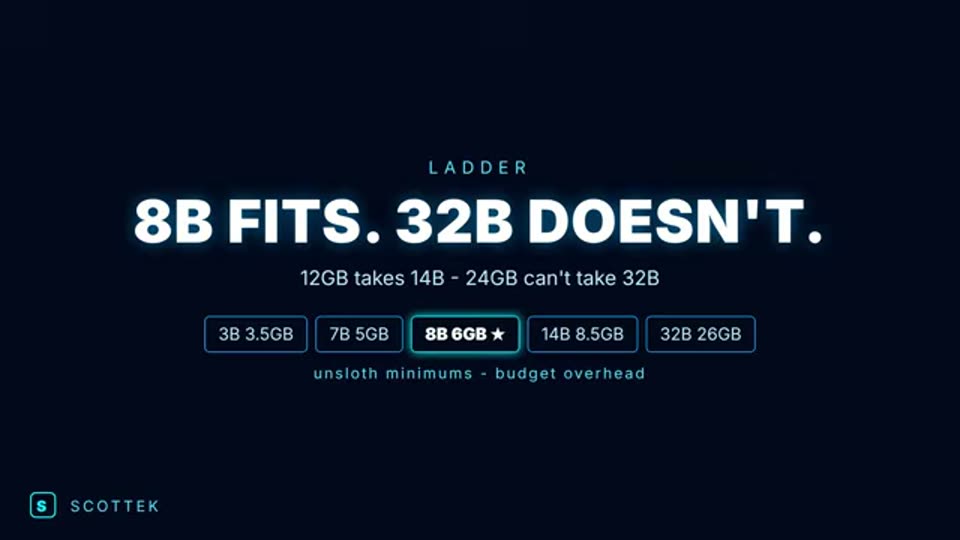
A used 8GB card therefore covers the 8B starter case with headroom, a 12GB card steps toward 14B, and short context plus batch size 1 or 2 is the documented way to stay under the ceiling. The same requirements page warns that some models need more than the minimum and that lowering batch size to 1 through 3 is the first fix for out-of-memory errors. When the local card is too small, the documented fallback is a free hosted notebook with a larger GPU, run unchanged.
Dataset prep pointers
The video's dataset rule is blunt, with 50 great pairs beating 5000 scraped ones, and the honest framing matters more than the count. Write examples in your own voice, in the exact output shape you want repeated, and keep private or unlicensed data out. A small purpose-built JSONL set with instruction plus input plus output per line is the pattern the flow assumes.
- Start small with 10 pairs for a response template or about 50 for a house style
- Match the target by keeping prompts short and outputs exactly formatted as wanted
- Hold out an exam of around 5 pairs never used in training for later checks
- Skip secrets such as credentials, private notes, or data that cannot be relicensed
- Prefer simpler tools when they fit, with a
Modelfilesystem prompt for tone and retrieval for document knowledge - Cap the first run at 1 to 3 epochs since small sets overfit fast, which is untested here as a prescription and follows the docs-sourced recipe
If two examples pasted into a system prompt already fix the behavior, that outcome is a signal not to fine-tune at all. Reserve training for formats and judgments repeated many times per week.
Training path with Colab plus local
The video covers one flow with two homes, local or hosted, and the Unsloth fine-tuning guide documents both the install and the free-notebook route. Locally the documented path centers on pip install unsloth inside one Python environment on the box that already hosts inference, with newer stacks pointing at updated torch plus triton plus the zoo package when cells complain. The hosted path opens the matching notebook for the chosen model, runs cells top to bottom, and re-runs erroring cells, which the guide treats as normal ritual rather than breakage. Either way the GPU check comes first with nvidia-smi and a short cuda available probe, and both paths are untested here.
- Verify the GPU with
nvidia-smibefore opening any notebook or local environment - Pick one home with a local install or a free hosted notebook carrying a larger GPU
- Load a 4-bit base in the 8B class with a short
max_seq_lengthsuch as2048 - Attach the adapter starting at
requal to16withlora_alphaequal to16 - Train short with learning rate
2e-4, batch size1or2, and 1 to 3 epochs - Watch three signals with falling loss, a decaying schedule, and a stable gradient norm
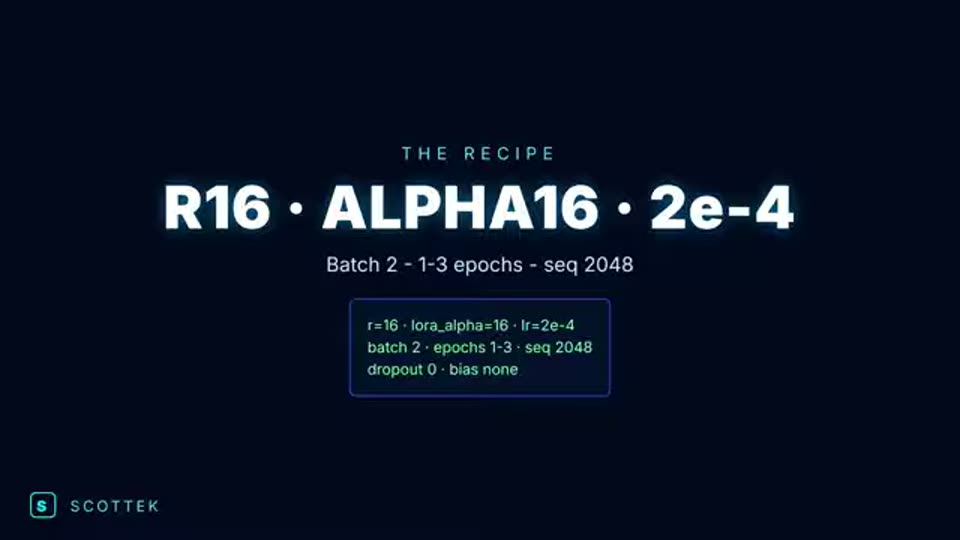
The recipe above is the docs-sourced starter from the hyperparameters guide, not a measured result. Raising r adds capacity at the cost of memory and overfit risk on small sets, while lowering the learning rate toward 1e-4 or 5e-5 is the steadier option the guide names. Keep sequence length short on 6GB because longer context eats the same headroom the adapter needs.
Quantize plus export to Ollama
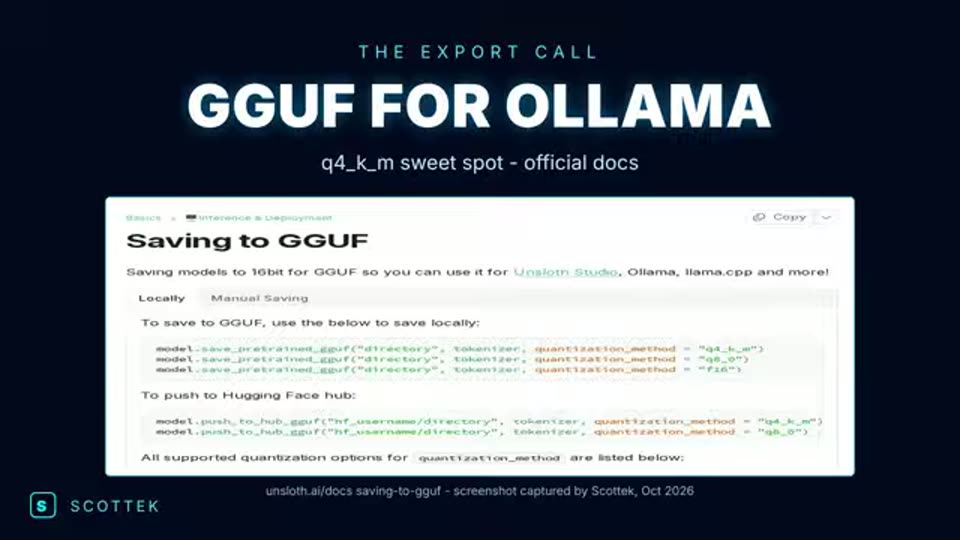
Training ends with a small adapter, while daily use wants one portable file, so the export step merges and quantizes. The saving-to-GGUF page documents the one-line path through model.save_pretrained_gguf with quantization_method set to q4_k_m, alongside q8_0 and f16 variants plus push_to_hub_gguf for Hub uploads. The same page documents the longer manual route through save_pretrained_merged with merged_16bit plus the llama.cpp conversion and quantize tools, which reaches the same destination with more steps. Quant choice is a size-versus-fidelity trade, with q4_k_m framed as the sweet spot and q8_0 keeping more quality at a larger size, and that framing reflects published characterizations rather than anything measured here.
- Export directly with
model.save_pretrained_ggufandq4_k_mfor the compact default - Keep a master with
f16when archival fidelity matters more than file size - Version optionally with
push_to_hub_ggufor keep weights local for privacy - Match templates by reusing the same chat template and end token at inference time
- Import simply with a short
Modelfilewhose first line isFROM ./model.gguf - Serve locally with
ollama createfollowed byollama runper the Modelfile reference
The Ollama Modelfile reference specifies FROM ./ollama-model.gguf as an absolute or Modelfile-relative path, with PARAMETER and SYSTEM lines for tuning and persona. That puts the custom model on localhost behind the same local API other agents already use. The related local-run guide below is the natural prerequisite when the Ollama side is not set up yet.
Evaluation honesty
Small fine-tunes fail in predictable ways, so judge the held-out exam rather than training prompts or hopes. Loss that falls then climbs points at overfit, which calls for fewer epochs or a smaller rank, while loss that never moves points at under-capacity or data and template mismatch. Keep eval prompts near the trained sequence length, since long-context recall is where quantization pressure shows first. Remember the ceiling too, because no flag changes the arithmetic that puts 32B at 26GB or 70B at 41GB. All of these checks are untested here and follow the documented failure modes plus the video's limits section.
- Test held-out prompts and compare side by side against the base model
- Stop early when loss rebounds, then cut epochs before adding data
- Fix the data first when loss stalls, checking quality and chat-template match
- Expect style gains rather than memorized facts, since documents belong in retrieval
- Re-loop deliberately with more pairs, one more epoch, re-export, and re-create
Related guide
Pair this build with Run AI Locally with Ollama plus Qwen3 on one GPU when the serving side needs setup first, since that companion covers installing Ollama and running a base model before teaching it custom habits here.