Self-Host n8n: Automate Your Homelab with AI (2026)

This companion guide starts from the video Self-Host n8n: Automate Your Homelab with AI (2026) and adds grounded detail from the official docs so every service in the rack can finally talk to every other one. The video is a narrated walkthrough rather than a filmed bench run, so every section below keeps In the video claims apart from Added from the sources research.
What the video covers and what this guide adds
- In the video: the mental model is that everything in n8n is a workflow where something happens plus steps run plus something comes out, built on a canvas by dragging a trigger node plus app nodes plus drawing lines, so hundreds of built-in integrations plus an HTTP node for anything with a web API replace cron scripts and glue code in five languages with visible plus testable plus retrying flows.
- In the video: timing matters because n8n ships a new minor almost weekly with the stable line at 2.43 carrying fresh October patches plus the 2.44 beta out for testers plus version 3.0 landing right now, and since 3.0 makes Docker the only install path while dropping npm installs entirely, installing the Docker way today skips the migration entirely.
- Added from the sources: the video identity is title Self-Host n8n plus Automate Your Homelab with AI plus 2026 at Watch link with upload date 2026-10-15 and duration about 665 seconds, and the transcript was fetched with auto-subs then stripped of tags and timestamps and read in full as the primary source for every In the video line below.
- Added from the sources: grounding comes from the n8n docs plus the Docker install page plus the AI docs, checked October 2026, with the standing caveat that agents and the assistant are both still labeled Preview so behavior can change.
Install with the one-liner or Docker Compose
- In the video: the easiest path on a fresh box is the one-line setup running
curl -fsSL https://get.n8n.io | sh, which checks for Docker plus creates an n8n directory plus generates secrets plus starts the whole stack of n8n itself plus the code sandbox plus a private SearXNG search instance, ending with the editor on port 5678 a few minutes later. - In the video: two warnings come with the one-liner, namely fresh installs only so never run it over an existing instance, and the curl-pipe-to-shell pattern means trusting the n8n server with root-adjacent access, so read the script or pin a version with the flags if that itches.
- Added from the sources: the compose path from the Docker install page runs image
docker.io/n8nio/n8npublishing exactly one port at 5678 with a named volume at/home/node/.n8nholding the SQLite database plus encryption keys plus logs, budgeting 4 GB of RAM plus 2 vCPUs for the Docker-in-Docker sandbox headroom, with Postgres as the documented graduate path for teams, quoted from the docs and untested here. - Added from the sources: pin versions in the compose file plus back up that volume so the whole automation brain survives migrations in one folder, and note the default SQLite file is fine for a homelab while queue mode is not supported for agents, quoted from the docs and untested here.
First workflow, webhooks, and the agents model
- In the video: the payoff is the editor canvas where workflows read left to right as trigger plus logic plus apps plus output, with a test-run button executing step by step so data flow is watchable per node, credentials in one encrypted vault instead of scattered across scripts, and a first build of a morning schedule trigger plus an HTTP health check plus a condition plus a Telegram message that already beats a cron job because every execution is logged plus inspectable plus rerunnable.
- In the video: graduating to webhooks means pointing Uptime Kuma or the reverse proxy at n8n so outside events drive inside actions, which pairs naturally with the Beszel plus Uptime Kuma monitoring guide for the alerting side.
- Added from the sources: agents run on every self-hosted plan since 2.32.3 including the free Community edition, on by default plus still Preview under Settings plus Agents, built from a model plus instructions plus tools plus skills plus sub-agents plus knowledge plus memory plus channels, with approvals for sensitive tools plus draft and published versions, per the AI docs, quoted and untested here.
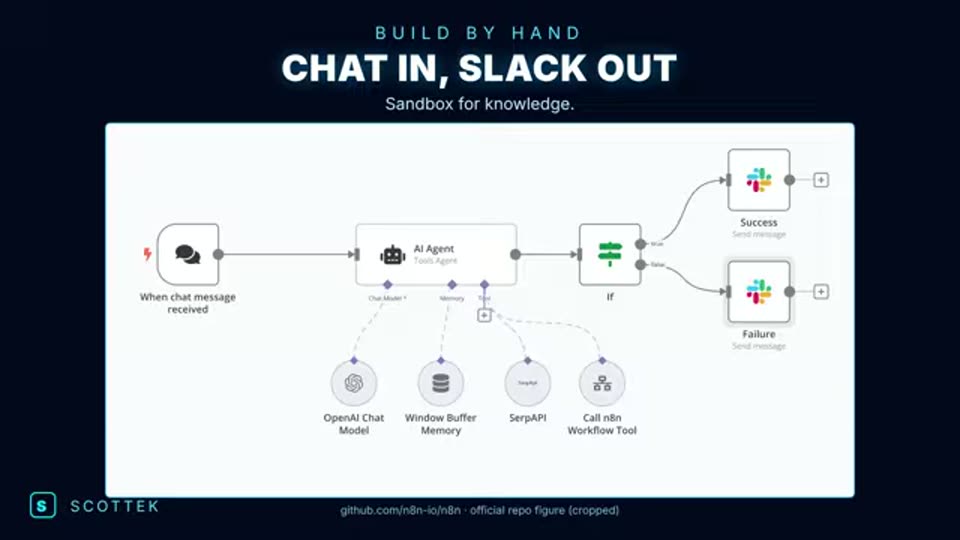
- Added from the sources: the accounting note is that every agent turn of one message in plus one response out counts as one execution, building one by hand means a tools-agent node wired between a chat trigger and tools, the knowledge base needs the shared code sandbox or that piece stays dark, channels need a public webhook URL via Tailscale Serve or the reverse proxy, and queue mode is not supported for agents, all quoted from the docs and untested here.
Assistant, four earning automations, and access design
- In the video: the assistant builds workflows from a described goal and needs three things on self-hosted Community, namely a model provider key from Anthropic plus OpenAI plus OpenRouter, a sandbox which the one-liner already provides, and optionally web search via the bundled SearXNG or a Brave key so it reads current docs instead of hallucinating APIs, with its build-and-test code executing isolated and never on the n8n server.
- In the video: the homelab jackpot is pointing the assistant at any OpenAI-compatible endpoint including a local one such as the Ollama box or the LocalAI server, so models on the own LAN drive it with zero per-token API bill, which pairs with the LocalAI 4.11 guide and the Ollama plus Qwen3 setup guide, a pairing quoted from the video and untested here.
- Added from the sources: four illustrative automations from the video are the certificate watchdog checking TLS expiry weekly with a page under 30 days out, the backup audit confirming last night jobs wrote files, the media pipeline from chat message to grab to Jellyfin scan, and Frigate person-after-midnight reflexes firing lights plus a phone snapshot plus a logged event, all presented as afternoon builds rather than shipped templates.
- Added from the sources: access design holds the keys to everything so never publish port 5678 to the internet, instead binding to the Tailscale IP or keeping it behind the reverse proxy with Authentik in front per the Authentik SSO guide, while noting single sign-on itself is a paid n8n feature so Community users protect login at the proxy layer, quoted from the docs and untested here.
License, money question, and the 3.0 migration caveats
- In the video: the money answer is precise with n8n code source-available under the Sustainable Use License where personal plus internal business use is free, the Community edition costs zero dollars with no license caps on executions or workflows so limits equal hardware, a free email registration unlocks folders plus debug-in-editor plus custom execution data, and money buys team features such as SSO plus projects plus environments plus Git plus hosted cloud tiers.
- In the video: three honest caveats close the video with agents plus assistant both still Preview so keep approvals on for anything destructive, if 3.0 lands mid-project open Settings and read the migration report with its impact badges plus back up first because old nodes such as Function plus Cron do not survive the jump, and respect the sandbox boundary with bundled local dev versus Daytona-style isolation for production.
- Added from the sources: the 3.0 migration facts from the docs are Docker-only with npm and npx removed,
binaryDatarenamed to storage with a refused start when both exist, unverified community nodes off by default, Code timeout at 60 seconds, and removed nodes including Function plus Cron plus Item Lists, quoted from the docs and untested here. - Added from the sources: the five-step index card from the video is install the Docker way with the one-liner on a fresh box plus compose for control plus port 5678 over Tailscale never the raw internet, build the morning health-check workflow, enable agents under Settings starting with one read-only tool, point the assistant at the local Ollama or LocalAI box, then back up the data volume and wire cert-expiry plus backup-audit workflows first.