COSMIC 1.10: Rust Desktop Grows Up (2026 Linux Guide)

This companion guide starts from the video COSMIC 1.10: Rust Desktop Grows Up (2026 Linux Guide) and adds grounded detail from the upstream release notes so the install decision rests on documented facts. The video is a narrated walkthrough built from the release notes rather than a filmed install, so every section below keeps In the video claims apart from Added from the sources research.
What the video covers and what this guide adds
- In the video: COSMIC Epoch 1.10.0 landed 8 October 2026, quietly tagged on GitHub with no big announcement, and the video frames it as the clearest sign yet that the System76 gamble is paying off, built from the release notes rather than hype.
- In the video: COSMIC is not another GNOME theme but a ground-up desktop started in 2021 after GNOME 40 broke System76 patches on Pop!_OS, written in Rust with the Iced toolkit on its own COSMIC Comp compositor, Wayland-only with no X11 fallback, GPL-3.0 licensed, with the first stable shipping alongside Pop!_OS 24.04 LTS in December 2025 and monthly epoch updates since.
- Added from the sources: the video identity is title COSMIC 1.10 plus Rust Desktop Grows Up plus 2026 Linux Guide at Watch link with upload date 2026-10-15 and duration about 668 seconds, and the transcript was fetched with auto-subs then stripped of tags and timestamps and read in full as the primary source for every In the video line below.
- Added from the sources: grounding comes from the Epoch 1.10.0 release notes plus the project README install docs plus the System76 COSMIC page, checked October 2026, with anything not personally tested marked untested.
The 1.10 headline changes
- In the video: the biggest feel-it change is the launcher rendering on the GPU by default, switching from software painting to WGPU rendering so the thing opened fifty times a day opens instantly, with the honest note that upstream quotes no benchmarks so none are claimed.
- Added from the sources: the launcher change is tracked upstream as using WGPU for rendering to improve performance, per the release notes, quoted and untested here.
- In the video: digital artists get the headline feature with drawing tablets mappable to specific displays through a dedicated settings page, fixing the stretched-across-every-screen pen problem on multi-monitor setups.
- Added from the sources: the tablet mapping is the release headline of a settings page for pinning a tablet to one display, per the release notes.
- In the video: the store got the largest feature bump with screenshot galleries that open properly instead of dead-ending, locally cached screenshots so browsing stops re-downloading, threaded decoding of large images so the catalog scrolls without hitching, and fixed missing app icons.
- In the video: the terminal gets keyboard tab shuffling with
Ctrl+Shift+LeftandCtrl+Shift+Right, and the system monitor splits app search from process search so finding Firefox stops surfacing dozens of renderer processes.
Sessions, networking, and login fixes
- In the video: sessions grow up with support for custom SSH agents instead of fighting the default, and environment variables living in the standard
~/.config/environment.ddirectory where automation and dotfile repos expect them. - In the video: networking gets a WireGuard fix where adding a connection with the Enter key works again with a proper confirmation flow, plus OpenVPN imports handling non-file URLs.
- In the video: the login screen gets safer with an empty keyboard-layout list no longer killing the greeter, and a wrong password now canceling the PAM session so account lockout actually locks.
- Added from the sources: the surrounding 1.10 fixes include touchscreen events focusing windows on tap, a tiling resize fix, hybrid-graphics machines no longer forcing dmabuf apps onto the NVIDIA dGPU, a suspend-on-AC fix when configured not to suspend, app-versus-process search split in the monitor, controls staying visible on hover in the player, file dialogs remembering sort order, panel edge expansion under fractional scaling, and no volume popup at startup, all per the release notes.
- In the video: under the hood the build migrates compilation plus the settings daemon from make to just, framed as boring, critical, and correct.
The no-AI-contributions rule and the 1.9 catch-up
- In the video: every COSMIC project updated its pull-request template with a hard rule that contributors must declare they included no LLM-generated content in the submission, not code, not comments, not even the description, while learning with AI and hunting bugs with AI remain allowed.
- Added from the sources: the rule was reported 7 October 2026 with GNOME Calendar and Extensions noted as carrying similar bans while GNOME debates letting AI-written bug reports in, per The Register.
- In the video: September 1.9.0 set the table with the COSMIC Viewer native image viewer with built-in editing, the COSMIC OSK on-screen keyboard driven by touch or gamepad with a login-screen toggle, a store design overhaul putting each app developer front and center, lock-screen wallpaper support, and file-manager icons for Windows executables.
- Added from the sources: daily-driver reviewers describe 1.9-era COSMIC as production-viable for keyboard-driven users, developers, and older hardware with built-in tiling, while flagging missing HDR, Night Light, VRR, and settings depth, per FOSS Linux, quoted and untested here.
- In the video: the honest gaps stand as of this release with still no HDR support, no Night Light, and no variable refresh rate, so anyone whose work depends on those treats COSMIC as a wait rather than a switch.

How to try it with real commands
- In the video: the easiest path is downloading the Pop!_OS 24.04 LTS ISO where COSMIC is the default and only session, or upgrading an existing 22.04 box with the release-upgrade command after a backup.
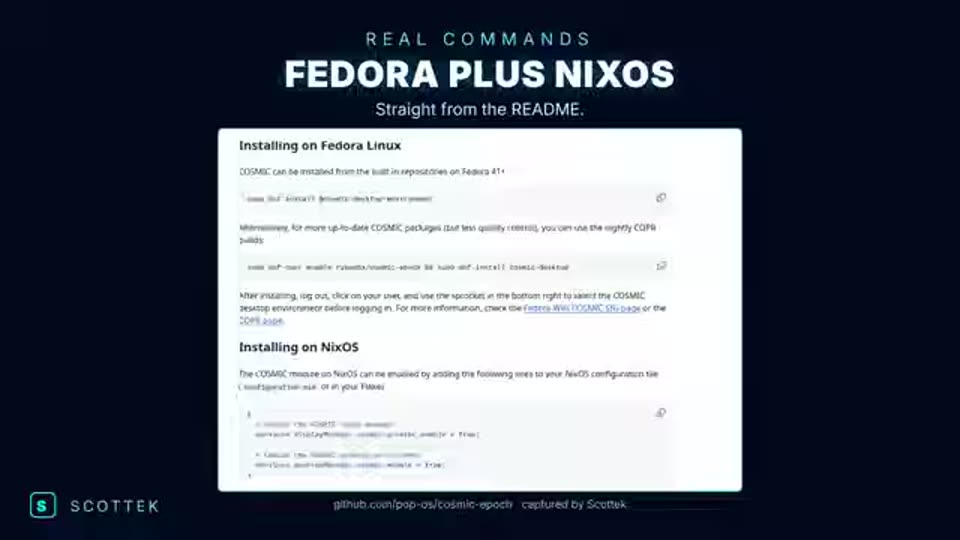
- Added from the sources: the install commands below are quoted verbatim from the official README, where third-party COPR and PPA builds are framed as carrying less quality control, and every path below is untested here.
- Added from the sources: on Arch install the session with
pacman -S cosmic-sessionor everything withpacman -S cosmic, on Fedora 41 and newer runsudo dnf install @cosmic-desktop-environmentwith the ryanabx COPR as the fresher-builds alternative, and on NixOS enable both the cosmic greeter display manager and the cosmic desktop manager in the system config then rebuild, all per the README and untested here. - In the video: three rules precede committing real hardware by trying it in a virtual machine first since COSMIC runs fine virtualized, snapshotting or imaging the system before installing a new desktop on bare metal, and giving it a week rather than an evening because tiling workflows pay off around day four.
- In the video: the verdict is try it now for keyboard-driven developers, tinkerers with a spare machine or VM, and anyone wanting tiling without homework, while HDR, Night Light, variable-refresh, and extension-fortress users stay put happily and check back in six months.
- Added from the sources: readers weighing the other Wayland-native option should see the KDE Plasma 6.8 guide plus the Fedora 45 guide for the distro that ships a COSMIC spin, and the monthly epoch cadence means rough edges carry a short runway toward 1.11.