Self-Host Your Own Vercel: Coolify 4.4 Guide (2026)

This companion guide starts from the video Self-Host Your Own Vercel: Coolify 4.4 Guide (2026) and adds grounded detail from the official Coolify docs so the deploy layer of the homelab runs on owned hardware. The video is a narrated walkthrough rather than a filmed server run, so every section below keeps In the video claims apart from Added from the sources research.
What the video covers and what this guide adds
- In the video: the pitch is the push-to-deploy magic of Vercel, Heroku, Netlify, and Railway running on a server the viewer owns with no meter running, pointed at any Linux box over SSH while Coolify builds each commit, ships the container, and wires up the reverse proxy with free SSL, with more than 500,000 self-hosted instances cited as proof it works.
- In the video: timing is version 4.4.0 landing 6 October followed by a patch string through 4.4.6 on 9 October, where the last patch pinned a PHP base image that was breaking self-hosted startups, so the advice is install today's build rather than last week's blog post.
- Added from the sources: the video identity is title Self-Host Your Own Vercel plus Coolify 4.4 Guide plus 2026 at Watch link with upload date 2026-10-15 and duration about 593 seconds, and the transcript was fetched with auto-subs then stripped of tags and timestamps and read in full as the primary source for every In the video line below.
- Added from the sources: grounding comes from the Coolify install docs plus the deploy-your-first-app docs plus the v4.4.0 release notes, checked October 2026, with anything not personally tested marked untested.
Requirements and the one-line install
- In the video: the docs ask for less than expected at two CPU cores, 2 GB of RAM, and 10 GB of disk, so a small VPS or a 64-bit Pi qualifies, across Debian, Ubuntu, Fedora, Arch, Alpine, and Raspberry Pi OS on Intel or ARM, but with one strong recommendation to use a fresh server because Coolify takes over Docker, the proxy, and the firewall story.
- In the video: installation is the docs one-liner
curl -fsSL https://cdn.coollabs.io/coolify/install.sh | bash, which is the curl-pipe-to-shell pattern, so read the script or accept that it runs with full control of the box, quoted from the video and untested here. - Added from the sources: after install the dashboard sits on port 8000 of the server IP, the first registrant owns the instance including root server access so the admin account must be claimed immediately, the
.envfile under the Coolify data directory holds the key that encrypts database values and must be backed up off the box, and pre-install means removing snap Docker in favor of the official Docker method, all quoted from the install docs and untested here. - Added from the sources: non-LTS Ubuntu needs the manual install path per the docs, and automated installs expect Ubuntu LTS or Debian, so exotic distributions should plan for the manual route, quoted from the docs and untested here.
First app, git workflow, and one-click state
- In the video: the smoke test is the docs-verbatim nginx path of new project plus create resource plus Docker image plus
nginx:alpinewith port 80 exposed plus deploy, ending in a generated testing domain that needs no DNS configuration and an nginx welcome page proving the whole chain of projects, containers, proxy, and URLs, with the troubleshooting note that a failure means checking port 80 first. - In the video: the real workflow connects a Git source and every push builds and deploys automatically with a Dockerfile or detecting build packs, while each pull request gets its own preview deployment with its own URL for clicking through a branch before merging, quoted from the video and untested here.
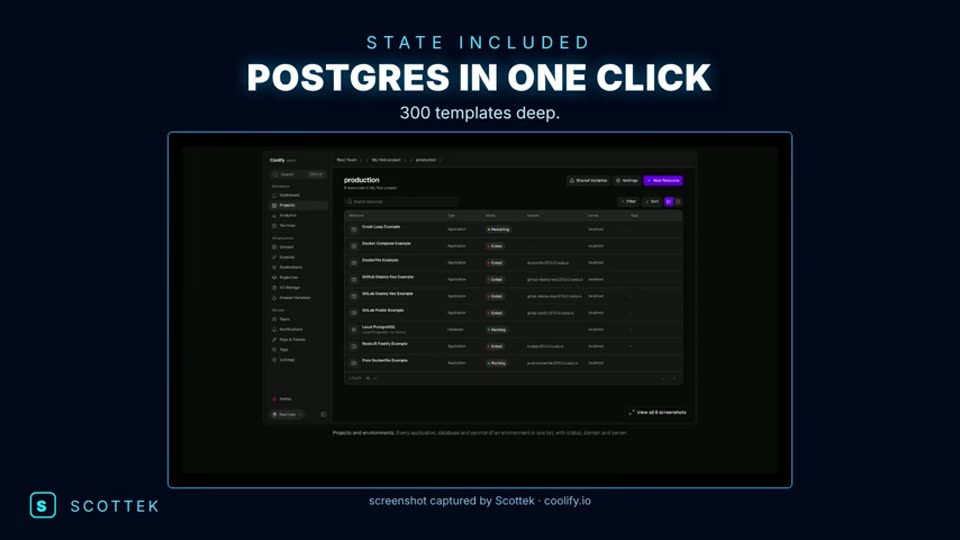
- Added from the sources: apps get state through one-click databases including Postgres, MySQL, Redis, and ClickHouse plus experimental SQLite that attaches to an app on the same server in one click with scheduled backups, and the service catalog holds around 300 ready-made templates, per the docs, quoted and untested here.
- Added from the sources: the catalog already covers prior channel ground with one-click Jellyfin per the Jellyfin 12 guide plus Vaultwarden per the passwords guide plus Uptime Kuma per the monitoring guide, while version 4.4 adds Linkwarden bookmarks, Lidarr, PeerTube, Snipe-IT, and more, per the release notes.
What is actually new in 4.4
- In the video: built-in traffic analytics for Traefik and Caddy runs on a rewritten Rust collector called Sentinel, flipped per server and off by default, reporting requests, bandwidth, unique visitors, and p95 latency plus maps, status codes, devices, and referrers with raw logs rotated and only aggregates kept, while nginx proxies stay out of scope and Caddy apps need a redeploy after flipping the toggle.
- In the video: three operational gifts land together with third-party secret managers where vault references resolve at deploy time and never sit in the Coolify database with log redaction, a team audit log of every UI, API, and webhook change with old-versus-new diffs encrypted at rest and pruned after 90 days, and readable container names through an optional prefix that keeps rolling updates working.
- Added from the sources: identity and plumbing gains include sign-in through any OpenID Connect provider with per-provider registration rules, Cloudflare tokens so Coolify creates and cleans up proxy DNS records itself, proper Docker registry logins instead of credentials in environment variables, and beta GitHub Actions runner pools on build servers with labeled, resource-limited job containers and the host Docker socket never mounted, per the release notes, quoted and untested here.
- Added from the sources: the operational pages worth knowing are the images page showing every image with size, age, and reclaimable space because builds pile up fast, named Docker volumes rather than bind paths, server roles splitting deployments-only versus builds-only versus both, and preview-deployment APIs, all quoted from the release notes and untested here.
Production hardening, gotchas, and the index card
- In the video: production talk keeps port 8000 off the raw internet behind a reverse proxy or on Tailscale, enforces the firewall, turns on 2FA plus single sign-on now that 4.4 makes it easy, schedules database backups to a second disk or S3, snapshots volumes with one tested restore, keeps the install-day
.envbackup off the box, and watches disk because full disks are the number-one homelab outage. - In the video: the gotchas are hungry builds that can wedge the same small box running Coolify so split build and deploy roles when growing, exotic distros taking the manual path, snap Docker removal first, experimental SQLite, and the standing truth that self-hosting the platform makes the viewer the platform team for updates, uptime, and 3 a.m. proxy mysteries.
- Added from the sources: guard the admin account like root because it is, and readers locking down access should follow the Authentik SSO guide plus the Tailscale versus Cloudflare Tunnel guide for the front-door decision.
- Added from the sources: the five-step index card from the video is provision the fresh Linux box and run the one-line installer, open port 8000 and claim the admin instantly with the
.envbacked up, ship the nginx test and see the welcome page, connect the Git source with one-click Postgres and push to watch it deploy, then wire OIDC, schedule backups, and flip on analytics.